Internet & Applications – Complete Notes for IBPS, SSC, RRB & Govt Exams
Internet and its Applications is a high-scoring chapter in every government job exam — especially IBPS, where digital banking knowledge is directly tested. This post covers everything: definition and history of the Internet, types of internet connections, World Wide Web vs Internet, URL structure, domain names, all major browsers, search engines, internet services (email, chatting, video conferencing, e-commerce, e-banking), and India's UPI/digital payment ecosystem — with memory tricks, one-liners, and 10 exam-focused FAQs.

Jump to section
- Introduction: Why Internet & Applications is a Banking Exam Favourite
- What is the Internet?
- History of the Internet
- Types of Internet Connections
- Intranet vs Extranet vs Internet
- World Wide Web (WWW)
- URL (Uniform Resource Locator)
- Internet Services
- Key Internet Terms
- UPI and Digital Payment Ecosystem (India)
- Memory Tricks
- One-Liner Recap (Quick Revision)
Introduction: Why Internet & Applications is a Banking Exam Favourite
The Internet has transformed banking — from physical passbooks to net banking, from physical cheques to UPI payments, from branch visits to mobile banking apps. Because bank employees work with internet-based systems every day, Internet & Applications is one of the most practically relevant chapters for banking exams.
Questions from this chapter are tested in diverse formats in IBPS, SBI, RRB, and Insurance exams:
- "WWW was introduced by ___?" → Tim Berners-Lee
- "Full form of URL is ___?" → Uniform Resource Locator
- "Which is India's largest payment system?" → UPI
- "BHIM stands for ___?" → Bharat Interface for Money
- "The first graphical web browser was ___?" → NCSA Mosaic
- "Cookie is associated with ___?" → Web browser tracking
- "IRCTC uses which internet service?" → E-reservation / E-commerce
This chapter also overlaps with Cyber Security (phishing, cookies, HTTPS), Networking (ISP, protocols), and Digital India (UPI, DigiLocker). Understanding Internet & Applications gives you a holistic picture of how digital India functions — and earns you points across multiple chapters simultaneously.
What is the Internet?
The Internet (short for International Network) is a worldwide system of interconnected computer networks — literally a "network of networks" — that allows billions of devices to communicate and share information globally.
Key Points:
- The Internet connects millions of private, public, academic, business, and government networks worldwide
- It uses the TCP/IP protocol suite as its universal communication language
- It is the world's largest Wide Area Network (WAN)
- No single entity owns the Internet — it is a decentralised, distributed system
Internet vs WWW — Critical Distinction:
| Feature | Internet | World Wide Web (WWW) |
|---|---|---|
| What it is | The global network infrastructure | A service that runs over the Internet |
| Includes | Email, FTP, streaming, gaming, VoIP, WWW | Only web pages and hyperlinks |
| Created by | ARPANET (1969) | Tim Berners-Lee (1989) |
| Nature | Infrastructure (hardware + protocols) | Application/service |
Exam Tip: Internet ≠ WWW. The WWW is just one service that runs on the Internet — like how calling is one service that runs on the telephone network.
History of the Internet
| Year | Event |
|---|---|
| 1969 | ARPANET launched by US Department of Defense — world's first packet-switching network; first connection between UCLA and Stanford |
| 1970s | Vint Cerf and Bob Kahn develop TCP/IP — the communication protocol that became the universal internet standard; Vint Cerf = Father of the Internet |
| Mid-1980s | NSFnet — high-capacity successor to ARPANET; connected US universities |
| 1989 | Tim Berners-Lee proposes the World Wide Web at CERN — "Father of the Web" |
| 1991 | WWW opened to the public; first website launched |
| 1993 | NCSA Mosaic — first graphical web browser; made internet accessible to non-technical users |
| 1995 | Internet commercialised; Amazon, eBay launched |
| 2004 | Facebook launched (Mark Zuckerberg) |
| 2007 | iPhone launched — beginning of mobile internet era |
| 2022 | ChatGPT launched — AI revolution on the Internet |
Types of Internet Connections
Different technologies are used to connect homes, offices, and mobile devices to the Internet:
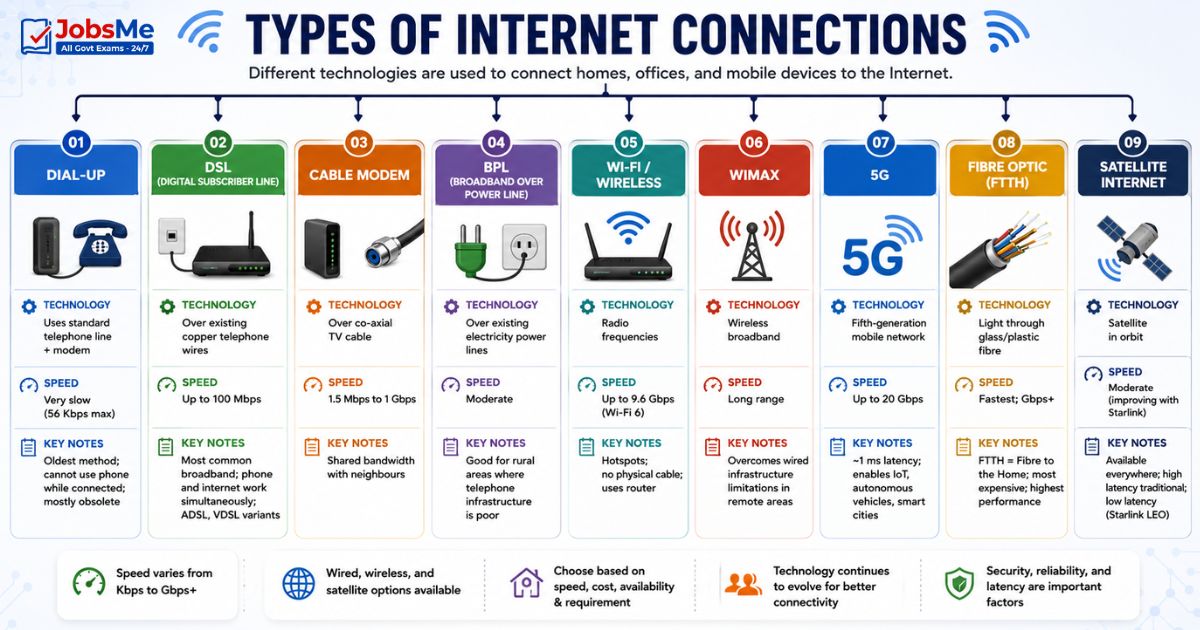
| Connection Type | Technology | Speed | Key Notes |
|---|---|---|---|
| Dial-Up | Uses standard telephone line + modem | Very slow (56 Kbps max) | Oldest method; cannot use phone while connected; mostly obsolete |
| DSL (Digital Subscriber Line) | Over existing copper telephone wires | Up to 100 Mbps | Most common broadband; phone and internet work simultaneously; ADSL, VDSL variants |
| Cable Modem | Over co-axial TV cable | 1.5 Mbps to 1 Gbps | Shared bandwidth with neighbours |
| BPL (Broadband over Power Line) | Over existing electricity power lines | Moderate | Good for rural areas where telephone infrastructure is poor |
| Wi-Fi / Wireless | Radio frequencies | Up to 9.6 Gbps (Wi-Fi 6) | Hotspots; no physical cable; uses router |
| WiMAX | Wireless broadband | Long range | Overcomes wired infrastructure limitations in remote areas |
| 5G | Fifth-generation mobile network | Up to 20 Gbps | ~1 ms latency; enables IoT, autonomous vehicles, smart cities |
| Fibre Optic (FTTH) | Light through glass/plastic fibre | Fastest; Gbps+ | FTTH = Fibre to the Home; most expensive; highest performance |
| Satellite Internet | Satellite in orbit | Moderate (improving with Starlink) | Available everywhere; high latency traditional; low latency (Starlink LEO) |
Key Terms:
- ISP (Internet Service Provider) — A company that provides internet access to homes and businesses (e.g., Airtel, Jio, BSNL, ACT Fibernet)
- Broadband — High-speed internet connection faster than 512 Kbps; always-on
- FTTH — Fibre to the Home — fibre optic cable directly to the home; fastest residential option
Intranet vs Extranet vs Internet
| Feature | Intranet | Extranet | Internet |
|---|---|---|---|
| Definition | Private internal network using internet tools and protocols | Extended intranet that allows selected external partners access | Global public network connecting all networks worldwide |
| Access | Employees/members only | Employees + selected business partners, suppliers, customers | Anyone with an internet connection |
| Ownership | One organisation | Shared between organisations | No single owner |
| Security | High — completely private | Moderate — controlled external access | Variable |
| Use | Internal HR, company policies, internal communication | Supplier portals, partner collaboration, B2B transactions | Public websites, email, social media |
| Examples | Hospital's internal staff portal, bank's internal system | Bank's portal for business clients, airline's agent portal | Google, Facebook, IRCTC |
World Wide Web (WWW)
The World Wide Web (WWW) was introduced on March 13, 1989 by Tim Berners-Lee at CERN (European Organisation for Nuclear Research) in Switzerland. It is a system of internet servers that supports hypertext and multimedia content, interconnected through hyperlinks.
Tim Berners-Lee also:
- Created the first URL (1991)
- Created HTML (HyperText Markup Language)
- Created the first web server (info.cern.ch)
- Created the first web browser (WorldWideWeb — later renamed Nexus)
Web Page, Website, Home Page
| Term | Definition |
|---|---|
| Web Page | A single document created using HTML; contains text, images, links, and multimedia; displayed in a web browser |
| Website | A collection of related web pages under the same domain name, hosted on a web server |
| Home Page | The first/main/default page of a website — what you see when you visit the site's main URL |
| Web Server | A computer that stores website files and delivers web pages to browsers on request (e.g., Apache, Nginx, IIS) |
| Hyperlink | A clickable element (text or image) that navigates to another page or resource |
| Hypertext | Text that contains links to other text/pages |
| HTML | HyperText Markup Language — the standard language used to create web pages |
| CSS | Cascading Style Sheets — controls the visual styling (colours, fonts, layout) of web pages |
| JavaScript | Scripting language that makes web pages interactive and dynamic |
Web Browsers
A web browser is software that locates, retrieves, and displays web content from web servers. It interprets HTML, CSS, and JavaScript to render web pages visually.
| Browser | Developer | Engine | Notes |
|---|---|---|---|
| Google Chrome | Blink | Most used browser globally; ~65% market share | |
| Microsoft Edge | Microsoft | Blink (Chromium-based since 2020) | Default Windows browser; replaced Internet Explorer |
| Mozilla Firefox | Mozilla | Gecko | Open-source; privacy-focused |
| Safari | Apple | WebKit | Default on Apple devices; iOS, macOS |
| Brave | Brave Software | Blink | Privacy-first; blocks ads by default |
| Opera | Opera | Blink | Feature-rich; built-in VPN |
Key Browser History:
- First graphical web browser → NCSA Mosaic (1993, Marc Andreessen)
- Internet Explorer → Officially discontinued June 15, 2022 — replaced by Edge
- First web browser ever → WorldWideWeb (1990, Tim Berners-Lee) — renamed Nexus
Search Engines
A search engine is a website that allows users to search for information on the internet by entering keywords. It uses web crawlers (spiders/bots) to index web pages and returns ranked results.
- A successful match = Hit
- An unsuccessful search = Miss
| Search Engine | Notes |
|---|---|
| World's largest; ~90% global market share | |
| Bing | Microsoft's search engine; powers DuckDuckGo results |
| Yahoo | Early internet pioneer; still active |
| DuckDuckGo | Privacy-focused; no tracking |
| Baidu | China's dominant search engine |
| Yandex | Russia's largest search engine |
| Perplexity AI | AI-powered conversational search engine |
| Google AI Overviews | Google's AI-integrated search feature |
URL (Uniform Resource Locator)
A URL (Uniform Resource Locator) is the unique web address that identifies the exact location of a specific resource (web page, image, file) on the Internet. The first URL was created by Tim Berners-Lee in 1991.
Structure of a URL
Example URL: https://www.jobsme.in/computer-awareness/basics
| Part | Example | Meaning |
|---|---|---|
| Protocol Identifier | https:// | Communication protocol to use (HTTP, HTTPS, FTP) |
| Subdomain | www | World Wide Web (optional; could be mail, blog, etc.) |
| Domain Name | jobsme.in | Unique name identifying the website |
| Directory Path | /computer-awareness/ | Folder/directory on the server |
| Page/File Name | basics | Specific page or file |
Another example breakdown: http://www.google.com/services/index.htm
- http:// = Protocol
- www = World Wide Web
- google.com = Domain name
- /services/ = Directory
- index.htm = Web page file
Domain Name System (DNS) and Domain Extensions
A Domain Name is the human-readable address of a website (e.g., sbi.co.in). DNS translates it into an IP address that computers use.
Common Domain Extensions (TLDs — Top Level Domains):
| Extension | Type | Meaning |
|---|---|---|
| .com | Generic | Commercial organisation |
| .gov | Generic | Government body |
| .edu | Generic | Educational institution |
| .mil | Generic | Military organisation |
| .net | Generic | Network resources |
| .org | Generic | Non-profit organisation |
| .info | Generic | Informational website |
| .in | Country Code | India |
| .uk | Country Code | United Kingdom |
| .au | Country Code | Australia |
| .us | Country Code | United States |
| .cn | Country Code | China |
| .io | Country Code (repurposed) | Tech/startup companies |
Internet Services
Email (Electronic Mail)
Email is the electronic version of sending and receiving letters — the most widely used internet service worldwide.
Email Format: username@hostname.domain (no spaces allowed anywhere)
- Example: candidate@sbi.co.in
- candidate = Username (local part)
- @ = Separator (pronounced "at")
- sbi.co.in = Host/Domain name
Key Email Terms:
| Term | Meaning |
|---|---|
| SMTP | Protocol for sending emails (port 25/587) |
| POP3 | Downloads emails to one device (port 110) |
| IMAP | Server-based; syncs across devices (port 143) |
| Inbox | Folder where received emails arrive |
| Outbox | Folder where emails wait to be sent |
| Sent Items | Folder containing copies of sent emails |
| Drafts | Emails started but not yet sent |
| Spam / Junk | Unsolicited bulk emails; often commercial or fraudulent |
| Attachment | A file (document, image, PDF) sent along with an email |
| CC (Carbon Copy) | Sends a copy to additional recipients — they can see who else received it |
| BCC (Blind Carbon Copy) | Sends a copy to additional recipients — they cannot see each other's addresses |
| Mailbox | Storage area on the email server for a user's emails |
| Emoticons/Smileys | Character combinations used to express emotions in text email (:-) = smile) |
Chatting and Instant Messaging
Online Chatting is real-time text (and multimedia) communication over the Internet. Unlike email, it is synchronous — both parties must be online.
| Platform | Notes |
|---|---|
| Most popular messaging app globally; end-to-end encrypted | |
| Telegram | Large group support; file sharing; bots |
| Skype | Video and voice calling; Microsoft-owned |
| Google Chat | Integrated into Google Workspace |
| Microsoft Teams | Business communication; integrated with Office 365 |
| Signal | Maximum privacy; open-source; end-to-end encrypted |
Video Conferencing
Video Conferencing allows real-time audio-video communication between geographically separated participants — vital for remote work, telemedicine, and online education.
| Platform | Company | Notes |
|---|---|---|
| Zoom | Zoom Video Communications | Most popular; HD video; breakout rooms |
| Google Meet | Free; integrated with Google Calendar | |
| Microsoft Teams | Microsoft | Business-focused; Office 365 integration |
| Cisco Webex | Cisco | Enterprise-level; highly secure |
| Skype | Microsoft | Consumer video calling |
E-Learning
E-Learning (Electronic Learning) is the delivery of education and training through digital means over the internet.
| Platform | Notes |
|---|---|
| DIKSHA | Digital Infrastructure for Knowledge Sharing — India's national school education platform |
| SWAYAM | India's MOOC platform for higher education |
| Coursera, edX | Global MOOC platforms |
| YouTube | Widely used for free educational content |
| NPTEL | National Programme on Technology Enhanced Learning — IIT/IISc courses |
E-Commerce
E-Commerce (Electronic Commerce) is the buying and selling of goods and services over the Internet. It uses EDI (Electronic Data Interchange) for business transactions.
Types of E-Commerce:
| Type | Full Form | Description | Examples |
|---|---|---|---|
| B2C | Business to Consumer | Businesses sell directly to individual consumers | Amazon, Flipkart, Meesho |
| B2B | Business to Business | Businesses transact with other businesses | Alibaba, IndiaMart, TradeIndia |
| C2C | Consumer to Consumer | Consumers sell to other consumers | OLX, eBay (auctions) |
| C2B | Consumer to Business | Consumers offer products/services to businesses | Freelance platforms (Upwork) |
| G2C | Government to Consumer | Government services to citizens | IRCTC, DigiLocker, income tax portal |
Popular E-Commerce Platforms:
| Platform | Parent | Notes |
|---|---|---|
| Amazon | Amazon Inc. | World's largest e-commerce |
| Flipkart | Walmart | India's largest e-commerce |
| Meesho | Meta-backed | Social commerce; reseller model |
| Myntra | Flipkart | Fashion e-commerce |
| Snapdeal | Snapdeal Ltd. | Indian e-commerce marketplace |
M-Commerce
M-Commerce (Mobile Commerce) is e-commerce conducted via wireless handheld devices — smartphones and tablets.
- Launched: 1997
- Coined by: Kevin Duffey (at the Global Mobile Commerce Forum)
- Examples: Shopping on Amazon mobile app, UPI payments, mobile banking apps
Social Networking
Social Networking connects people online through shared interests, relationships, and communication.
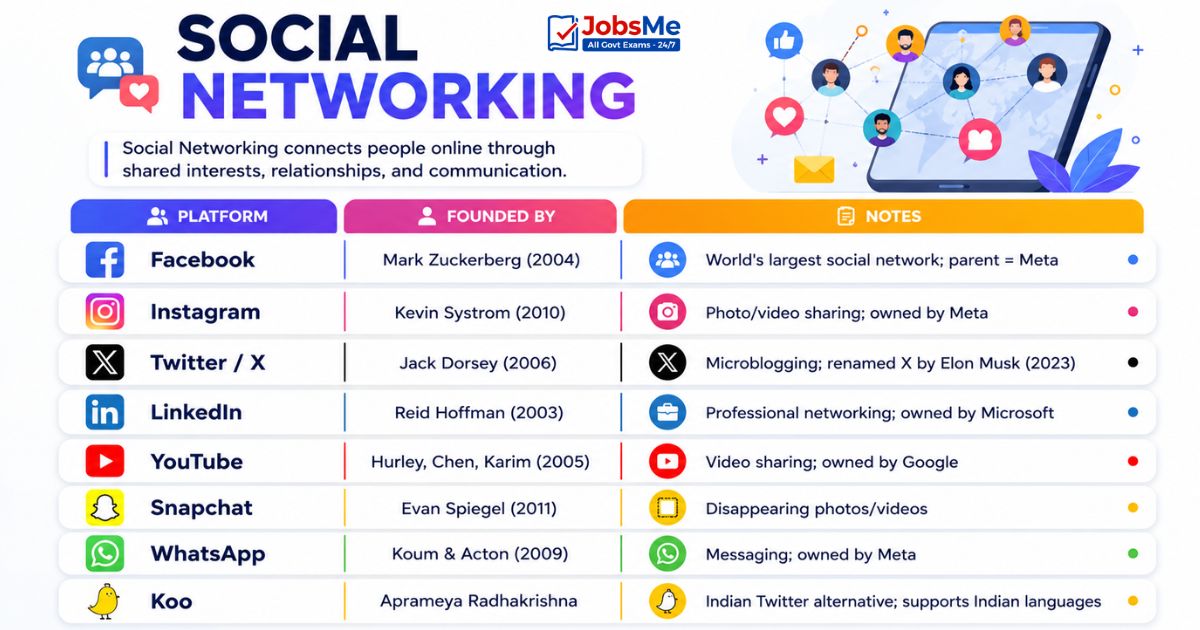
| Platform | Founded By | Notes |
|---|---|---|
| Mark Zuckerberg (2004) | World's largest social network; parent = Meta | |
| Kevin Systrom (2010) | Photo/video sharing; owned by Meta | |
| Twitter / X | Jack Dorsey (2006) | Microblogging; renamed X by Elon Musk (2023) |
| Reid Hoffman (2003) | Professional networking; owned by Microsoft | |
| YouTube | Hurley, Chen, Karim (2005) | Video sharing; owned by Google |
| Snapchat | Evan Spiegel (2011) | Disappearing photos/videos |
| Koum & Acton (2009) | Messaging; owned by Meta | |
| Koo | Aprameya Radhakrishna | Indian Twitter alternative; supports Indian languages |
Other Internet Services
| Service | Description |
|---|---|
| E-Banking / Net Banking | Managing bank accounts, transfers, payments over the internet |
| E-Reservation | Booking train, bus, flight tickets online — e.g., IRCTC (trains), MakeMyTrip, Yatra |
| E-Shopping | Buying products online — Amazon, Flipkart, Meesho |
| Podcast | Digital audio/video programme available for subscription and automatic download |
| Blog | Short for Web Log — an online journal or discussion website |
| Newsgroup / Usenet | Online discussion area organised around specific topics |
| VOIP | Voice Over Internet Protocol — making phone calls over the internet (WhatsApp calls, Skype) |
| Streaming | Real-time playback of audio/video — Netflix, Spotify, YouTube |
Key Internet Terms
| Term | Definition |
|---|---|
| Cookie | A small file stored by a web server in your browser that tracks your activity, preferences, and login sessions — makes websites "remember" you |
| Bookmark | A saved link to a frequently visited webpage for quick access |
| Hyperlink | A clickable element (text, image, button) that navigates to another web page or resource |
| HTML | HyperText Markup Language — standard language for creating web pages using < > tags |
| CSS | Cascading Style Sheets — controls the appearance and layout of web pages |
| JavaScript | Client-side scripting language that makes web pages interactive |
| IP Address | A unique numerical address (IPv4: 32-bit; IPv6: 128-bit) identifying each device on the internet |
| Bandwidth | Maximum data transfer rate of an internet connection; measured in bps |
| Cluster | A group of servers working together to share workload and provide redundancy |
| Web Crawler / Spider | Automated bot used by search engines to browse and index web pages |
| Cache | Temporarily stored web content in your browser to speed up future page loads |
| Proxy Server | An intermediary server that hides your real IP address; can filter content and improve security |
| Firewall | Security system that filters incoming and outgoing internet traffic based on rules |
| VPN | Virtual Private Network — encrypts your internet connection and hides your IP address |
UPI and Digital Payment Ecosystem (India)
India's digital payment ecosystem is one of the most advanced in the world — and a very high-priority topic for banking exams.
| Service | Full Form | Developer | Description |
|---|---|---|---|
| UPI | Unified Payments Interface | NPCI (National Payments Corporation of India) | Instant real-time interbank payment system; India's largest payment system; works 24×7×365 |
| BHIM | Bharat Interface for Money | NPCI | UPI-based payment app developed by the Government of India |
| PhonePe | — | Walmart/Flipkart | India's largest UPI app by transaction volume |
| Google Pay | — | UPI payment app; second most popular | |
| Paytm | — | One97 Communications | Payment wallet + UPI + banking services |
| RuPay | Rupee Payment | NPCI | India's own domestic card payment network (alternative to Visa/Mastercard) |
| IMPS | Immediate Payment Service | NPCI | 24×7 instant interbank fund transfer; works even on holidays |
| NEFT | National Electronic Funds Transfer | RBI | Batch-based fund transfer; was not 24×7 until 2019; now 24×7 |
| RTGS | Real Time Gross Settlement | RBI | For large-value transactions (min ₹2 lakh); real-time |
| AePS | Aadhaar-enabled Payment System | NPCI | Bank transactions using Aadhaar biometric authentication |
| ONDC | Open Network for Digital Commerce | Government of India | India's open protocol for e-commerce; alternative to Amazon/Flipkart monopoly |
Key Digital Payment Distinctions:
| Service | Minimum Amount | Settlement | 24×7? |
|---|---|---|---|
| NEFT | No minimum | Batch | Yes (since 2019) |
| RTGS | ₹2 lakh | Real-time | Yes |
| IMPS | ₹1 | Real-time | Yes |
| UPI | ₹1 | Real-time | Yes |
Memory Tricks
🔑 Internet vs WWW:
Internet = Infrastructure (the roads) WWW = Service running on it (the cars) "Internet is the ROAD; WWW is the CAR you drive on it"
🔑 WWW History:
Tim Berners-Lee introduced WWW on March 13, 1989 Remember: "TB Lee gave us WWW in '89"
🔑 URL Structure - "PSDD":
Protocol → Subdomain → Domain → Directory/Page Example: https:// → www → google.com → /search
🔑 Email Protocols - "SPI":
SMTP = Send | POP3 = Pull (download) | IMAP = Inbox stays on server
🔑 Email CC vs BCC:
CC = Carbon Copy — everyone can see who got it BCC = Blind Carbon Copy — recipients are hidden from each other
🔑 UPI/NPCI Digital Payments:
UPI + BHIM + RuPay + IMPS + NEFT + RTGS = all under NPCI/RBI NPCI = UPI, RuPay, IMPS, BHIM | RBI = NEFT, RTGS
🔑 E-Commerce Types:
B2B = Big companies deal (Alibaba) B2C = Business to Customer (Amazon) C2C = Customer sells to Customer (OLX)
🔑 First Graphical Browser:
NCSA Mosaic (1993) was the first graphical browser "Mosaic Made the web Mainstream"
One-Liner Recap (Quick Revision)
- The Internet is a worldwide network of networks using TCP/IP protocols — the world's largest WAN — while the World Wide Web is just one service (web pages) that runs on top of the Internet.
- Vint Cerf is called the Father of the Internet for co-developing TCP/IP in the 1970s; ARPANET (1969) was the world's first packet-switching network.
- The World Wide Web was introduced on March 13, 1989 by Tim Berners-Lee at CERN, who also created HTML, the first URL, and the first web browser.
- NCSA Mosaic (1993) was the world's first graphical web browser, making the internet accessible to non-technical users for the first time.
- A URL (Uniform Resource Locator) is the unique address of a resource on the Internet, consisting of protocol, subdomain, domain name, directory, and file name components.
- An ISP (Internet Service Provider) is a company that provides internet access — examples in India include Jio, Airtel, BSNL, ACT Fibernet, and Hathway.
- Email format is username@hostname.domain with no spaces — SMTP sends emails (port 25), POP3 downloads emails (port 110), and IMAP syncs emails on the server (port 143).
- A Cookie is a small file stored by a website in your browser to track user activity, preferences, and sessions — enabling websites to "remember" you across visits.
- E-Commerce (buying/selling over the internet) types include B2C (Amazon, Flipkart), B2B (Alibaba), C2C (OLX), and G2C (IRCTC, income tax portal).
- M-Commerce (Mobile Commerce) was coined by Kevin Duffey in 1997 and refers to commercial transactions conducted via wireless handheld devices.
- UPI (Unified Payments Interface), developed by NPCI, is India's largest and fastest real-time payment system, enabling 24×7 instant bank-to-bank transfers.
- BHIM (Bharat Interface for Money) is the government's UPI-based payment app; RuPay is India's own domestic card payment network — both developed by NPCI.
- NEFT and RTGS are RBI-managed fund transfer systems — NEFT is batch-based (now 24×7, no minimum), while RTGS is real-time for large amounts (minimum ₹2 lakh).
- A Blog (Web Log) is an online journal or discussion website; a Podcast is a digital audio programme available for automatic download/subscription.
- BCC (Blind Carbon Copy) in email sends a copy to additional recipients whose identities are hidden from other recipients, while CC (Carbon Copy) makes all recipients visible to each other.
Preparing for competitive exams requires consistent revision. Platforms like JobsMe simplify preparation through:
- Daily Current Affairs
- Weekly Current Affairs
- Monthly Current Affairs
- Static GK for Competitive Exams
- Latest Government Jobs Notifications
- Banking Awareness
Stay updated, revise regularly, and attempt quizzes for better accuracy in UPSC, SSC CGL, IBPS PO/Clerk, SBI, RBI Grade B, RRB NTPC, Defence, and State PSC exams.
Free quiz • No signup required
Put this topic into practice with Daily Current Affairs Quiz 9 June 2026 MCQs for UPSC, SSC, Banking, Railways, Defence & State PSC Exams. It is the quickest way to reinforce what you just learned.
Frequently Asked Questions
What is the difference between the Internet and the World Wide Web?
What is a URL and what are its components?
What is a Cookie in internet terminology?
What is the difference between Intranet, Extranet, and Internet?
What is UPI and how does it work?
What is the difference between NEFT, RTGS, and IMPS?
What is E-Commerce and what are its types?

About the author