Data Communication & Protocols – Complete Notes for IBPS, SSC, RRB & Govt Exams
Data Communication and Protocols is one of the highest-scoring topics in IBPS, SSC CGL, RRB NTPC, and Insurance exams. This post covers everything — types of signals, simplex/half-duplex/full-duplex channels, guided and unguided transmission media, the complete 7-layer OSI model with mnemonics, the 4-layer TCP/IP model, all key protocols (HTTP, HTTPS, FTP, SMTP, POP3, IMAP, DNS, DHCP, ARP, TCP, UDP, SSH, VoIP), and IP addressing — with memory tricks, one-liners, and 10 exam-focused FAQs.

Jump to section
- Introduction: Why Data Communication is Tested in Every Exam
- What is Data Communication?
- Types of Signals
- Communication Channels - Direction of Data Flow
- Transmission Media
- OSI Model - The 7-Layer Framework
- TCP/IP Model - The Internet's Working Model
- Key Network Protocols - Complete Reference
- IP Addressing
- Other Networking Terms
- Memory Tricks
- One-Liner Recap (Quick Revision)
Introduction: Why Data Communication is Tested in Every Exam
Every digital interaction — sending a WhatsApp message, making a UPI payment, loading a webpage, receiving an email — involves data communication following specific protocols. The rules that govern how data travels from one computer to another are the foundation of the entire networked world.
In government job exams, this chapter is tested because banking operations, government services, and digital India initiatives are all built on these protocols. Questions appear as:
- "Which layer of OSI is responsible for routing?" → Network Layer (Layer 3)
- "HTTP works at which OSI layer?" → Application Layer (Layer 7)
- "Which protocol is used for sending emails?" → SMTP
- "Which mode allows simultaneous two-way communication?" → Full Duplex
- "Fibre optic cable transmits which type of signal?" → Light (optical) signals
- "IPv4 uses ___ bit addresses" → 32 bits
This chapter also provides the framework needed to understand all internet services, network security, and cloud computing. The OSI model in particular is one of the most frequently tested concepts in computer awareness — mastering its 7 layers and associated protocols is essential.
What is Data Communication?
Data Communication is the process of transmitting data (information) from one device to another through a transmission medium (wired or wireless) following a set of rules called protocols.
Five Components of Data Communication:
| Component | Description |
|---|---|
| Sender | The device that sends the data (source) — e.g., your computer |
| Receiver | The device that receives the data (destination) — e.g., a web server |
| Message | The actual data/information being transmitted — text, audio, video, image |
| Transmission Medium | The physical path the data travels — cables, radio waves, fibre optic |
| Protocol | The set of rules governing how data is formatted, transmitted, and received |
Protocol — A protocol is a set of standardised rules that define how devices on a network communicate with each other — format of data, timing, sequencing, error checking, and addressing. Without protocols, devices from different manufacturers could not communicate.
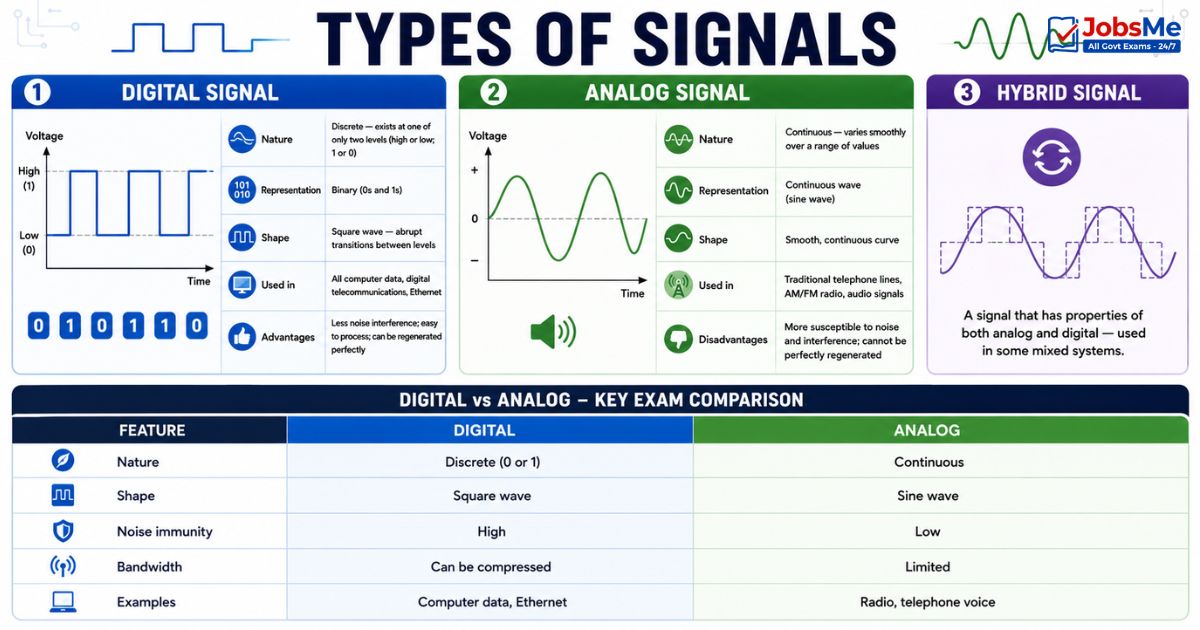
Types of Signals
Digital Signal
| Feature | Details |
|---|---|
| Nature | Discrete — exists at one of only two levels (high or low; 1 or 0) |
| Representation | Binary (0s and 1s) |
| Shape | Square wave — abrupt transitions between levels |
| Used in | All computer data, digital telecommunications, Ethernet |
| Advantages | Less noise interference; easy to process; can be regenerated perfectly |
Analog Signal
| Feature | Details |
|---|---|
| Nature | Continuous — varies smoothly over a range of values |
| Representation | Continuous wave (sine wave) |
| Shape | Smooth, continuous curve |
| Used in | Traditional telephone lines, AM/FM radio, audio signals |
| Disadvantages | More susceptible to noise and interference; cannot be perfectly regenerated |
Hybrid Signal
A signal that has properties of both analog and digital — used in some mixed systems.
Digital vs Analog - Key Exam Comparison:
| Feature | Digital | Analog |
|---|---|---|
| Nature | Discrete (0 or 1) | Continuous |
| Shape | Square wave | Sine wave |
| Noise immunity | High | Low |
| Bandwidth | Can be compressed | Limited |
| Examples | Computer data, Ethernet | Radio, telephone voice |
Communication Channels - Direction of Data Flow
The communication channel defines in what direction data can flow between two communicating devices.
Simplex
| Feature | Details |
|---|---|
| Direction | One direction only — data flows only from sender to receiver; never the other way |
| Analogy | A one-way street |
| Examples | Radio broadcasting, Television broadcast, keyboard sending to computer |
| Exam Key | Simplex = ONE direction only; no reply possible |
Half Duplex
| Feature | Details |
|---|---|
| Direction | Both directions — but NOT simultaneously — only one device can send at a time |
| Analogy | A one-lane bridge — only one direction of traffic at a time; the other must wait |
| Examples | Walkie-Talkie (you say "over" to signal you're done), CB radio |
| Exam Key | Half Duplex = both directions but NOT at the same time; Walkie-Talkie |
Full Duplex
| Feature | Details |
|---|---|
| Direction | Both directions simultaneously — both devices can send and receive at the same time |
| Analogy | A two-lane road — traffic flows freely in both directions simultaneously |
| Examples | Telephone call, mobile phone, video call (Zoom/Teams) |
| Exam Key | Full Duplex = both directions SIMULTANEOUSLY; telephone |
Communication Channel Summary:
| Mode | Direction | Simultaneous? | Example |
|---|---|---|---|
| Simplex | One way only | N/A | Radio, TV broadcast |
| Half Duplex | Both ways | NO | Walkie-Talkie |
| Full Duplex | Both ways | YES | Telephone, mobile |
Transmission Media
Transmission Media is the physical path through which data travels from sender to receiver. It is broadly divided into Guided (Wired) and Unguided (Wireless) media.
Guided (Wired) Media
Guided media uses a physical conductor — the data travels along a specific, contained path.
1. Twisted Pair Cable
| Feature | Details |
|---|---|
| Structure | Two copper wires twisted together; insulated with plastic |
| Why twisted? | Twisting reduces electromagnetic interference (EMI) between pairs |
| Types | UTP (Unshielded Twisted Pair) — no extra shielding, cheaper; STP (Shielded Twisted Pair) — extra shielding, better EMI protection |
| Speed | Up to 10 Gbps (Cat 6a and above) |
| Cost | Least expensive guided medium |
| Used in | LAN (Ethernet), telephone networks, home internet |
| Exam Key | Cheapest wired medium; UTP most common in LANs |
2. Co-axial Cable
| Feature | Details |
|---|---|
| Structure | Single copper conductor at centre, surrounded by insulator, metallic shield, and outer jacket |
| Speed | Higher frequency than twisted pair |
| Advantages | Better shielding against interference than twisted pair |
| Used in | Cable TV (MAN), early Ethernet networks, broadband internet distribution |
| Exam Key | Used in Cable TV; better than twisted pair; higher frequency |
3. Fibre Optic Cable
| Feature | Details |
|---|---|
| Structure | Thin strands of glass or plastic that transmit data as pulses of light |
| Speed | Fastest transmission medium — can achieve Tbps |
| EMI immunity | Not affected by electromagnetic interference at all |
| Distance | Can transmit over very long distances without signal degradation |
| Cost | Most expensive guided medium |
| Used in | Internet backbone, undersea cables, long-distance networks, FTTH (Fibre to the Home) |
| Exam Key | Fastest; uses light; not affected by EMI; most expensive; internet backbone |
Guided Media Comparison:
| Medium | Speed | Cost | EMI Immunity | Primary Use |
|---|---|---|---|---|
| Twisted Pair | Low-Medium | Lowest | Low | LAN, telephone |
| Co-axial | Medium | Medium | Medium | Cable TV, broadband |
| Fibre Optic | Highest | Highest | Complete | Internet backbone, FTTH |
Unguided (Wireless) Media
Unguided media transmits data through the air (or vacuum) using electromagnetic waves — no physical conductor.
| Type | Direction | Frequency | Primary Use |
|---|---|---|---|
| Radio Waves | Omnidirectional (all directions) | Low to high | AM/FM radio, Wi-Fi, Bluetooth, cellular networks |
| Microwave | Unidirectional (point-to-point) | 0.3 GHz - 300 GHz | Cellular networks, satellite TV, radar, long-distance telephone |
| Infrared | Short range, line-of-sight | Above 300 GHz | TV remotes, wireless speakers, short-range device communication |
| Satellite | Long distance | Varies | GPS, international TV, satellite internet, ships, aircraft |
| 5G | Cellular (mmWave) | 24-100 GHz | Mobile broadband, IoT, smart cities |
Key Wireless Facts:
- Wi-Fi uses radio waves at 2.4 GHz, 5 GHz, and 6 GHz
- Bluetooth uses 2.4 GHz ISM band
- Satellite communication uses microwave frequencies
- mmWave (Millimetre Wave) — used by 5G for very high speed but short range
- Gbps = fastest speed unit for wireless connections
OSI Model - The 7-Layer Framework
The OSI (Open Systems Interconnection) Model is a conceptual framework developed by ISO (International Organisation for Standardisation) in 1983 that standardises how different computer systems communicate over a network. It divides network communication into 7 distinct layers, each with a specific responsibility.
Why 7 layers? By dividing communication into layers, changes to one layer don't affect the others — for example, you can change the physical cable type without rewriting application software.
Data travels DOWN the OSI layers at the sender (encapsulation) and UP the OSI layers at the receiver (decapsulation).
Layer 7 - Application Layer (Topmost)
| Feature | Details |
|---|---|
| What it does | Provides the interface between the network and the user's application — this is the layer the user directly interacts with |
| PDU (Protocol Data Unit) | Data |
| Key Device | Gateway |
| Key Protocols | HTTP, HTTPS, FTP, SMTP, DNS, Telnet, DHCP, POP3, IMAP, SSH |
| Exam Key | Layer closest to the user; all application protocols live here |
Layer 6 - Presentation Layer
| Feature | Details |
|---|---|
| What it does | Translates data between the application layer and the network — handles encryption/decryption, compression/decompression, and data format translation |
| PDU | Data |
| Key Protocols | MIME, JPEG, MPEG, GIF, PNG, ASCII, SSL/TLS (encryption) |
| Exam Key | "Translator" layer; encryption happens here; JPEG and MPEG formats |
Layer 5 - Session Layer
| Feature | Details |
|---|---|
| What it does | Establishes, manages, maintains, and terminates communication sessions between applications; handles authentication and authorisation |
| PDU | Data |
| Key Protocols | RPC (Remote Procedure Call), NetBIOS, AppleTalk, PPTP |
| Exam Key | Session = "Conversation manager"; sets up and tears down sessions |
Layer 4 - Transport Layer
| Feature | Details |
|---|---|
| What it does | Provides end-to-end delivery of data between applications; handles segmentation, reassembly, flow control, and error recovery |
| PDU | Segment (TCP) / Datagram (UDP) |
| Key Protocols | TCP (reliable), UDP (unreliable/fast) |
| Port numbers | Transport layer uses port numbers to identify applications (HTTP=80, HTTPS=443, FTP=21) |
| Exam Key | End-to-end delivery; TCP vs UDP; segmentation; port numbers |
Layer 3 - Network Layer
| Feature | Details |
|---|---|
| What it does | Handles routing — determines the best path for data to travel from source to destination across multiple networks; handles logical addressing (IP addresses) |
| PDU | Packet |
| Key Device | Router |
| Key Protocols | IP, ARP, ICMP, RIP, OSPF, BGP |
| Exam Key | Routing; IP addresses; Router operates here; Layer 3 |
Layer 2 - Data Link Layer
| Feature | Details |
|---|---|
| What it does | Provides error-free transmission between two directly connected nodes; packages data into frames; handles MAC addressing; error detection (but not correction) |
| PDU | Frame |
| Key Devices | Switch, Bridge |
| Key Protocols | Ethernet, PPP (Point-to-Point Protocol), MAC protocol |
| Exam Key | Frames; MAC addresses; Switch and Bridge operate here; Layer 2 |
Layer 1 - Physical Layer (Bottommost)
| Feature | Details |
|---|---|
| What it does | Transmits raw bits (0s and 1s) over the physical medium — defines electrical voltages, cable types, connectors, timing |
| PDU | Bit |
| Key Devices | Hub, Repeater |
| Key Protocols | Ethernet (physical aspects), USB, Bluetooth physical layer |
| Exam Key | Raw bits; physical cables; Hub and Repeater operate here; Layer 1 |
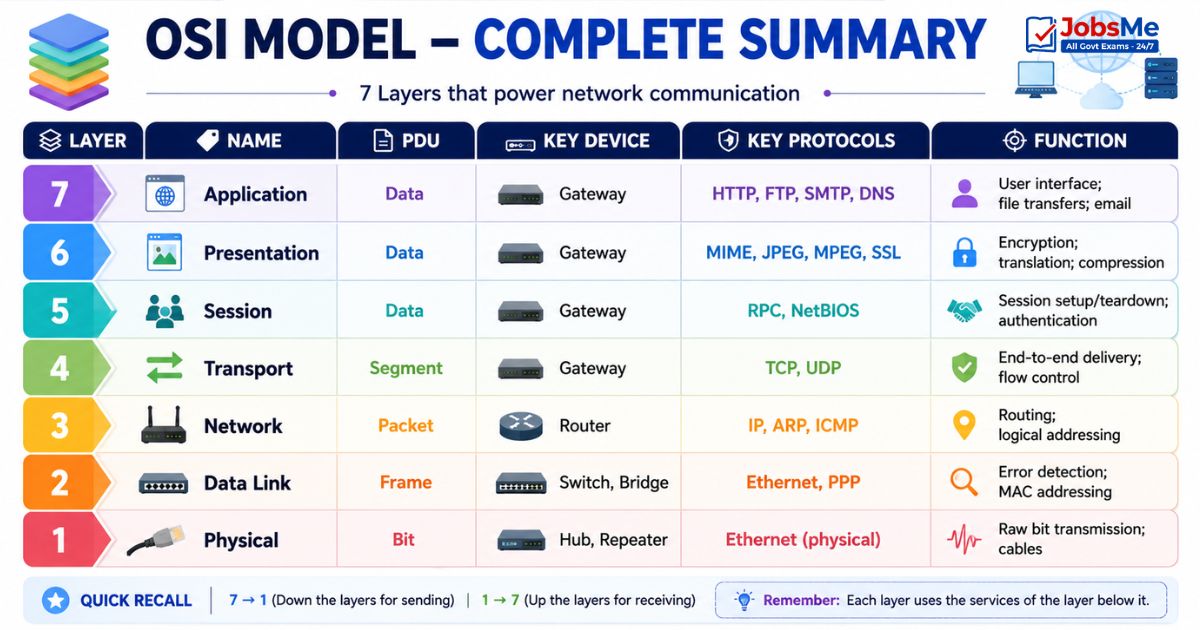
OSI Model - Complete Summary Table
| Layer | Name | PDU | Key Device | Key Protocols | Function |
|---|---|---|---|---|---|
| 7 | Application | Data | Gateway | HTTP, FTP, SMTP, DNS | User interface; file transfers; email |
| 6 | Presentation | Data | Gateway | MIME, JPEG, MPEG, SSL | Encryption; translation; compression |
| 5 | Session | Data | Gateway | RPC, NetBIOS | Session setup/teardown; authentication |
| 4 | Transport | Segment | Gateway | TCP, UDP | End-to-end delivery; flow control |
| 3 | Network | Packet | Router | IP, ARP, ICMP | Routing; logical addressing |
| 2 | Data Link | Frame | Switch, Bridge | Ethernet, PPP | Error detection; MAC addressing |
| 1 | Physical | Bit | Hub, Repeater | Ethernet (physical) | Raw bit transmission; cables |
Memory Tip for Layers (Top to Bottom): "All People Seem To Need Data Processing"
Application | Presentation | Session | Transport | Network | Data Link | Physical
Memory Tip for Layers (Bottom to Top): "Please Do Not Throw Sausage Pizza Away"
Physical | Data Link | Network | Transport | Session | Presentation | Application
TCP/IP Model - The Internet's Working Model
The TCP/IP Model (also called the Internet Model or DoD Model) is the practical model actually used by the Internet. It was developed by the US Department of Defense and is simpler than the OSI model — it has 4 layers instead of 7.
| TCP/IP Layer | Corresponds to OSI Layers | Key Protocols |
|---|---|---|
| Application | Layers 5, 6, 7 (Session + Presentation + Application) | HTTP, HTTPS, FTP, SMTP, DNS, Telnet |
| Transport | Layer 4 (Transport) | TCP, UDP |
| Internet | Layer 3 (Network) | IP, ARP, ICMP |
| Network Access | Layers 1, 2 (Physical + Data Link) | Ethernet, Wi-Fi |
Comparison: OSI vs TCP/IP
| Feature | OSI Model | TCP/IP Model |
|---|---|---|
| Layers | 7 layers | 4 layers |
| Developed by | ISO (1983) | US Department of Defense |
| Nature | Theoretical/conceptual | Practical/implemented |
| Use | Reference model; teaching | Actual Internet protocol suite |
| Application layer | Separate Presentation and Session layers | Combined into one Application layer |
| Physical layer | Separate | Combined into Network Access layer |
Exam Key Fact: OSI = 7 layers (reference model); TCP/IP = 4 layers (actual internet model). OSI is theoretical; TCP/IP is practical.
Key Network Protocols - Complete Reference
A protocol is a standardised set of rules that governs how data is formatted, transmitted, and received between devices. Here is the complete reference for all exam-relevant protocols:
Web Protocols
| Protocol | Full Form | Function | Port |
|---|---|---|---|
| HTTP | HyperText Transfer Protocol | Transfers web pages from server to browser | 80 |
| HTTPS | HyperText Transfer Protocol Secure | HTTP + TLS/SSL encryption; padlock in browser; secure web | 443 |
| HTTP/3 | — | Latest web protocol; uses QUIC instead of TCP; faster | 443 (UDP) |
Email Protocols
| Protocol | Full Form | Function | Port |
|---|---|---|---|
| SMTP | Simple Mail Transfer Protocol | Sending emails from client to server or between servers | 25 / 587 |
| POP3 | Post Office Protocol version 3 | Receiving emails; downloads emails to device; removes from server | 110 |
| IMAP | Internet Message Access Protocol | Receiving emails; emails stay on server; access from multiple devices | 143 |
SMTP vs POP3 vs IMAP:
- SMTP = Always for sending
- POP3 = Download and delete from server (one device)
- IMAP = Server-based; syncs across all devices (modern standard)
File Transfer Protocols
| Protocol | Full Form | Function | Port |
|---|---|---|---|
| FTP | File Transfer Protocol | Transfers files between computers over a network | 21 |
| SFTP | Secure FTP | FTP with SSH encryption | 22 |
| TFTP | Trivial FTP | Simplified FTP; no authentication; used on local networks | 69 |
Network Management Protocols
| Protocol | Full Form | Function |
|---|---|---|
| DNS | Domain Name System | Translates human-readable domain names (google.com) to IP addresses (142.250.182.46) |
| DHCP | Dynamic Host Configuration Protocol | Automatically assigns IP addresses to devices joining a network |
| ARP | Address Resolution Protocol | Maps a known IP address to a MAC address on a local network |
| RARP | Reverse ARP | Maps a known MAC address to an IP address (reverse of ARP) |
| SNMP | Simple Network Management Protocol | Monitors and manages network devices remotely |
| ICMP | Internet Control Message Protocol | Error reporting and diagnostics; used by the ping command |
Remote Access Protocols
| Protocol | Full Form | Function | Port |
|---|---|---|---|
| Telnet | Teletype Network | Remote login to another computer over a network; unencrypted | 23 |
| SSH | Secure Shell | Encrypted remote login; secure replacement for Telnet | 22 |
| RDP | Remote Desktop Protocol | Microsoft's protocol for accessing a Windows desktop remotely | 3389 |
Other Important Protocols
| Protocol | Full Form | Function |
|---|---|---|
| TCP | Transmission Control Protocol | Reliable, connection-oriented; converts messages to packets; guarantees delivery and order; uses handshaking |
| UDP | User Datagram Protocol | Fast, connectionless; no guarantee of delivery or order; no error checking; used for speed-critical apps (video streaming, gaming, DNS, VoIP) |
| IP | Internet Protocol | Handles addressing and routing of packets; IPv4 = 32-bit; IPv6 = 128-bit |
| PPP | Point-to-Point Protocol | Establishes dial-up connection to Internet over telephone line |
| SSL/TLS | Secure Sockets Layer / Transport Layer Security | Encryption protocol for securing internet communications; TLS 1.3 is latest |
| WPA3 | Wi-Fi Protected Access 3 | Latest Wi-Fi security/encryption standard |
| VoIP | Voice over Internet Protocol | Carries voice calls over IP networks (Internet) — e.g., Skype, WhatsApp calls |
| WAP | Wireless Application Protocol | Protocol for accessing internet on early mobile devices |
| MQTT | Message Queuing Telemetry Transport | Lightweight messaging protocol for IoT devices |
TCP vs UDP - Critical Comparison:
| Feature | TCP | UDP |
|---|---|---|
| Type | Connection-oriented | Connectionless |
| Reliability | Reliable — guarantees delivery | Unreliable — no guarantee |
| Order | Maintains packet order | No ordering |
| Speed | Slower | Faster |
| Error checking | Yes | Minimal |
| Handshaking | 3-way handshake | None |
| Use cases | Web browsing, email, file transfer | Video streaming, VoIP, gaming, DNS |
IP Addressing
IPv4
| Feature | Details |
|---|---|
| Bit size | 32 bits |
| Format | 4 groups of 8 bits (octets) in decimal, separated by dots — e.g., 192.168.1.1 |
| Total addresses | 2³² = approximately 4.3 billion unique addresses |
| Classes | 5 classes: A, B, C (commonly used for hosts), D (multicast), E (research) |
| Current status | Running out of addresses — exhaustion of IPv4 is why IPv6 was developed |
IPv4 Classes:
| Class | First Octet Range | Default Subnet Mask | Use |
|---|---|---|---|
| A | 1 - 126 | 255.0.0.0 | Large networks (governments, ISPs) |
| B | 128 - 191 | 255.255.0.0 | Medium networks |
| C | 192 - 223 | 255.255.255.0 | Small networks (most common) |
| D | 224 - 239 | — | Multicast |
| E | 240 - 255 | — | Research/experimental |
IPv6
| Feature | Details |
|---|---|
| Bit size | 128 bits |
| Format | 8 groups of 4 hexadecimal digits separated by colons — e.g., 2001:0db8:85a3:0000:0000:8a2e:0370:7334 |
| Total addresses | 2¹²⁸ = approximately 340 undecillion addresses (essentially unlimited) |
| No broadcast | IPv6 has NO broadcast messages (uses multicast and anycast instead) |
| Address types | Unicast (one interface), Multicast (multiple interfaces), Anycast (nearest interface) |
| Benefits | Larger address space; built-in security (IPSec); no need for NAT; better routing |
IPv4 vs IPv6 Comparison:
| Feature | IPv4 | IPv6 |
|---|---|---|
| Bit size | 32 bits | 128 bits |
| Address format | Decimal (192.168.1.1) | Hexadecimal (2001:db8::1) |
| Total addresses | ~4.3 billion | ~340 undecillion |
| Broadcast | Yes | No |
| Security | Optional (IPSec) | Built-in (IPSec) |
| Configuration | Manual or DHCP | Auto-configuration (SLAAC) |
Other Networking Terms
| Term | Meaning |
|---|---|
| Multiplexing | Transmitting multiple signals over a single communication channel simultaneously — one path, multiple data streams |
| CDMA | Code Division Multiple Access — channel access method for wireless networks; used in 3G mobile |
| PSTN | Public Switched Telephone Network — traditional telephone network using circuit switching |
| ISDN | Integrated Services Digital Network — carries voice, video, and data simultaneously over digital telephone lines |
| Packet Switching | Data broken into packets; each packet may take a different route; reassembled at destination — used by Internet |
| Circuit Switching | Dedicated path established for the entire duration of a call — used by traditional telephone |
| Bandwidth | Maximum data transfer rate of a channel; measured in bps |
| Throughput | Actual data transferred successfully; always ≤ bandwidth |
| Latency | Time delay in data transmission; measured in ms |
| Port Number | A 16-bit number that identifies a specific application/service on a device (HTTP=80, HTTPS=443, FTP=21, SSH=22) |
Memory Tricks
🔑 OSI Layers - Top to Bottom (7 to 1):
"All People Seem To Need Data Processing" Application → Presentation → Session → Transport → Network → Data Link → Physical
🔑 OSI Layers - Bottom to Top (1 to 7):
"Please Do Not Throw Sausage Pizza Away" Physical → Data Link → Network → Transport → Session → Presentation → Application
🔑 Layer Devices (Most Tested):
Layer 1 = Hub and Repeater (dumb, just signal) Layer 2 = Switch and Bridge (MAC-smart) Layer 3 = Router (IP-smart, most intelligent) Layer 7 = Gateway (all-knowing)
🔑 Email Protocols - "SPI":
SMTP = Sending | POP3 = Pull/Download | IMAP = Inbox on server Remember: "Send Post to Inbox" = SMTP POP3 IMAP
🔑 TCP vs UDP:
TCP = Tediously Checks Packets (reliable, slow) UDP = Unchecked Data Push (fast, unreliable)
🔑 Communication Direction:
Simplex = Single direction (Radio) Half Duplex = Half and half (Walkie-Talkie) Full Duplex = Full both ways (Phone)
🔑 Transmission Media Speed:
Twisted Pair < Co-axial < Fibre Optic (fastest) "TCP" — but remember Twisted < Co-axial < Optical!
🔑 IPv4 vs IPv6:
IPv4 = 4×8 = 32 bits = 4.3 billion addresses IPv6 = 6 groups × more bits = 128 bits = virtually unlimited
One-Liner Recap (Quick Revision)
- Data Communication is the process of transmitting data from one device to another through a transmission medium following a set of rules called protocols.
- Digital signals are discrete (0s and 1s represented as square waves), while Analog signals are continuous (smooth sine waves) — computers use digital signals internally.
- Simplex communication is one-way only (like radio), Half Duplex is both ways but not simultaneously (like walkie-talkie), and Full Duplex is simultaneously both ways (like a telephone call).
- Fibre Optic cable is the fastest transmission medium, transmitting data as light pulses — it is completely immune to electromagnetic interference and is used for internet backbone networks.
- Twisted Pair cable is the cheapest guided medium — UTP (Unshielded) is most common in LANs while STP (Shielded) provides better EMI protection.
- The OSI (Open Systems Interconnection) Model was developed by ISO in 1983 and divides network communication into 7 layers, each with a specific responsibility.
- The OSI layer mnemonic from top to bottom is "All People Seem To Need Data Processing" — Application, Presentation, Session, Transport, Network, Data Link, Physical.
- A Router operates at Layer 3 (Network Layer) using IP addresses; a Switch operates at Layer 2 (Data Link Layer) using MAC addresses; a Hub operates at Layer 1 (Physical Layer).
- The TCP/IP model is the practical model used by the Internet — it has 4 layers (Application, Transport, Internet, Network Access) corresponding to the 7 OSI layers.
- HTTP (port 80) transfers web pages; HTTPS (port 443) is the secure version using TLS encryption; both operate at the Application Layer (Layer 7).
- SMTP (port 25) is used for sending emails; POP3 (port 110) downloads emails to one device; IMAP (port 143) keeps emails on the server and syncs across all devices.
- TCP is a reliable, connection-oriented protocol that guarantees delivery and ordering of packets; UDP is a fast, connectionless protocol with no delivery guarantee — used for streaming and gaming.
- DNS (Domain Name System) translates human-readable domain names like google.com into machine-readable IP addresses like 142.250.182.46.
- DHCP (Dynamic Host Configuration Protocol) automatically assigns IP addresses to devices that join a network, eliminating the need for manual IP configuration.
- IPv4 uses 32-bit addresses (~4.3 billion addresses), while IPv6 uses 128-bit hexadecimal addresses (~340 undecillion addresses) — IPv6 was developed to address IPv4 exhaustion.
Preparing for competitive exams requires consistent revision. Platforms like JobsMe simplify preparation through:
- Daily Current Affairs
- Weekly Current Affairs
- Monthly Current Affairs
- Static GK for Competitive Exams
- Latest Government Jobs Notifications
- Banking Awareness
Stay updated, revise regularly, and attempt quizzes for better accuracy in UPSC, SSC CGL, IBPS PO/Clerk, SBI, RBI Grade B, RRB NTPC, Defence, and State PSC exams.
Free quiz • No signup required
Put this topic into practice with Daily Current Affairs Quiz 10 June 2026 MCQs for UPSC, SSC, Banking, Railways, Defence & State PSC Exams. It is the quickest way to reinforce what you just learned.
Frequently Asked Questions
What is the OSI model and why does it have 7 layers?
What is the difference between TCP and UDP?
What is the difference between SMTP, POP3, and IMAP?
What is DNS and how does it work?
What is the difference between IPv4 and IPv6?
What is the difference between HTTP and HTTPS?
What is the difference between Simplex, Half Duplex, and Full Duplex communication?

About the author