Computer Networking – Complete Notes for IBPS, SSC, RRB & Govt Exams
Computer Networking is a consistently high-scoring topic in IBPS, SSC CGL, RRB NTPC, and all government exams. This post covers everything — types of networks (PAN, LAN, MAN, WAN, CAN, SAN), network models (P2P, Client-Server), all networking devices (Hub, Switch, Router, Gateway, Modem), network topologies with diagrams, Wi-Fi standards up to Wi-Fi 7, and Bluetooth — with memory tricks, one-liners, and 10 exam-focused FAQs.
Jump to section
- Introduction: Why Networking is Critical for Govt Exam Preparation
- What is a Computer Network?
- History of Computer Networks - ARPANET
- Types of Computer Networks
- Network Models
- Network Devices - Complete Guide
- Network Topology
- Wi-Fi Standards (IEEE 802.11)
- Bluetooth and Other Wireless Technologies
- Ethernet - The LAN Standard
- Memory Tricks
- One-Liner Recap (Quick Revision)
Introduction: Why Networking is Critical for Govt Exam Preparation
Computer Networking is the backbone of modern banking, government, and commerce. Every time you use internet banking, swipe a card at a POS terminal, send an email, or make a UPI payment — a computer network is working behind the scenes. This is precisely why Networking is tested so heavily in IBPS, SSC, RRB, and Insurance exams.
Questions from this chapter appear regularly in the following patterns:
- "Which network covers the largest geographical area?" → WAN
- "Which device works at the Network Layer (Layer 3) of OSI?" → Router
- "Which topology uses a central hub?" → Star Topology
- "ARPANET was developed by ___?" → Vint Cerf / US Department of Defense
- "Wi-Fi 6 corresponds to which IEEE standard?" → 802.11ax
- "Which network device regenerates signals?" → Repeater
Networking also overlaps with the Data Communication & Protocols chapter (OSI model, TCP/IP), the Internet chapter (WWW, URL), and Cyber Security — making it a pivot topic that supports understanding across multiple chapters. Master networking, and a large portion of Computer Awareness becomes easier.
What is a Computer Network?
A Computer Network is a collection of two or more computers and other devices connected together — through wired or wireless media — to share information, resources, and services.
Key Resources That Can Be Shared:
- Files and documents
- Printers and scanners
- Internet connection
- Software applications
- Storage space (servers)
Components of a Network:
- Hardware — computers, cables, routers, switches, NICs
- Software — OS networking stack, protocols, network management software
- Transmission Media — physical (copper wire, fibre optic) or wireless (radio waves, infrared)
- Protocols — rules governing how data is sent and received (TCP/IP, HTTP, etc.)
Why do we build networks? Without networks, every computer would be an isolated island. Networks enable collaboration, resource sharing, communication, and centralised data management — all essential for modern banking, government, and business operations.
History of Computer Networks - ARPANET
| Milestone | Year | Details |
|---|---|---|
| ARPANET | 1969 | The world's first packet-switching network; developed by the US Department of Defense's ARPA (Advanced Research Projects Agency); considered the direct ancestor of the modern Internet |
| Vint Cerf | 1970s | Known as the Father of the Internet; co-developed the TCP/IP protocol suite that became the foundation of internet communication |
| NSFnet | mid-1980s | High-capacity successor to ARPANET; connected US universities and research institutions; gradually replaced ARPANET |
| Public Internet | 1991 | World Wide Web introduced by Tim Berners-Lee; internet opened to the public |
Exam Key Fact: ARPANET was the first network (1969). Vint Cerf is the Father of the Internet. These are tested in almost every government exam.
Types of Computer Networks
Computer networks are classified based on their geographical coverage — how large an area they span.
PAN (Personal Area Network)
| Feature | Details |
|---|---|
| Full Form | Personal Area Network |
| Coverage | Approximately 10 metres — within a single person's personal space |
| Technology Used | Bluetooth, USB, Zigbee, Infrared, NFC |
| Purpose | Connecting personal devices — smartphone to laptop, wireless earbuds to phone, smartwatch to smartphone |
| Examples | Connecting your phone to your laptop via Bluetooth; wireless keyboard to a computer |
| Exam Key | Smallest network; Bluetooth is the primary technology |
LAN (Local Area Network)
| Feature | Details |
|---|---|
| Full Form | Local Area Network |
| Coverage | A single building or campus — office, school, hospital |
| Technology Used | Ethernet (wired), Wi-Fi (wireless), Token Ring |
| Speed | High speed — 100 Mbps to 10 Gbps |
| Ownership | Single owner (one company or organisation) |
| Purpose | Connecting computers within an organisation to share printers, files, and internet |
| Examples | Office network, school computer lab, home network |
| Exam Key | Most commonly used network; inexpensive; high speed |
MAN (Metropolitan Area Network)
| Feature | Details |
|---|---|
| Full Form | Metropolitan Area Network |
| Coverage | A city or town — larger than LAN, smaller than WAN |
| Technology Used | Co-axial cable, fibre optic, WiMAX |
| Speed | Moderate to high |
| Purpose | Connecting multiple LANs across a city |
| Examples | Cable TV network, city-wide Wi-Fi, bank branch networks across a city |
| Exam Key | Covers a city; Cable TV is a classic MAN example |
WAN (Wide Area Network)
| Feature | Details |
|---|---|
| Full Form | Wide Area Network |
| Coverage | State, country, or worldwide — largest geographical span |
| Technology Used | ATM, Frame Relay, X.25, leased lines, satellite links |
| Speed | Variable — typically slower than LAN due to long distances |
| Ownership | Multiple owners — governments, telecom companies |
| Examples | The Internet (largest WAN), bank networks connecting branches nationwide |
| Exam Key | Internet = worldwide public WAN; largest network type |
CAN (Campus Area Network)
| Feature | Details |
|---|---|
| Full Form | Campus Area Network |
| Coverage | Multiple buildings within a limited area — a university campus, corporate campus |
| Technology | Interconnected LANs |
| Examples | IIT campus network, corporate headquarters campus |
| Exam Key | Larger than LAN, smaller than MAN; specific to campuses |
SAN (Storage Area Network)
| Feature | Details |
|---|---|
| Full Form | Storage Area Network |
| Purpose | A high-speed network that provides block-level access to centralised storage — allowing multiple servers to access the same storage devices as if they were locally attached |
| Technology | Fibre Channel, iSCSI |
| Used in | Data centres, large enterprises, banks with high-volume data |
| Exam Key | Specialised storage network; not for general user communication |
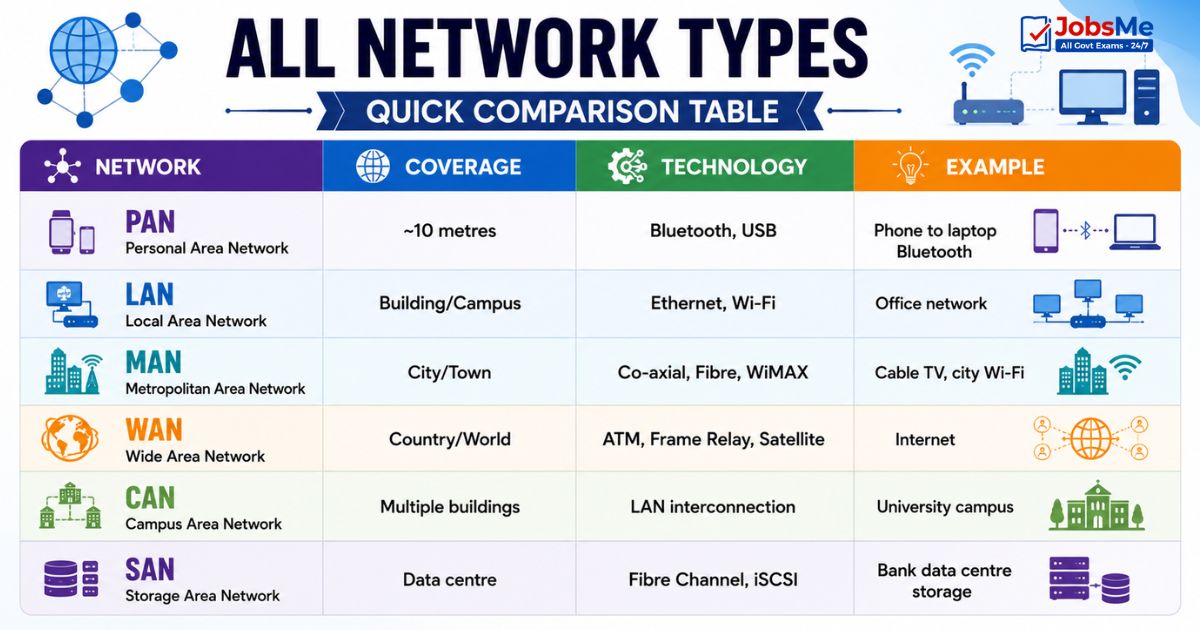
Quick Comparison Table - All Network Types
| Network | Coverage | Technology | Example |
|---|---|---|---|
| PAN | ~10 metres | Bluetooth, USB | Phone to laptop Bluetooth |
| LAN | Building/Campus | Ethernet, Wi-Fi | Office network |
| MAN | City/Town | Co-axial, Fibre, WiMAX | Cable TV, city Wi-Fi |
| WAN | Country/World | ATM, Frame Relay, Satellite | Internet |
| CAN | Multiple buildings | LAN interconnection | University campus |
| SAN | Data centre | Fibre Channel, iSCSI | Bank data centre storage |
Network Models
Peer-to-Peer (P2P) Network
| Feature | Details |
|---|---|
| Structure | Every computer is both a client and a server — each can request services and provide services |
| No central server | All computers are equal; no dedicated server |
| Advantages | Simple to set up; inexpensive; no single point of failure |
| Disadvantages | Less secure; harder to manage as network grows; no centralised backup |
| Used for | Small home networks, file sharing (BitTorrent), blockchain networks |
| Examples | BitTorrent, early Napster, home networks |
Client-Server Network
| Feature | Details |
|---|---|
| Structure | A dedicated, powerful server responds to requests from multiple client computers |
| Server role | Provides services, resources, and data to clients |
| Client role | Requests services from the server |
| Advantages | Centralised management; better security; scalable; centralised backup |
| Disadvantages | Expensive server hardware; server failure affects all clients |
| Used in | All enterprise networks, banks, internet, cloud services |
| Examples | Web server (Apache) serving web pages to browsers; bank server serving ATMs |
Key Terms:
- Server — The most powerful computer in a network; provides resources/services
- File Server — A dedicated server that provides file access to network users over LAN
- Web Server — A server that hosts websites and delivers web pages to browsers (e.g., Apache, Nginx)
Network Devices - Complete Guide
Network devices are the hardware components that connect computers and manage data flow within and between networks. Each device operates at a specific layer of the OSI model.
Repeater
| Feature | Details |
|---|---|
| OSI Layer | Physical Layer (Layer 1) |
| Function | Receives a weakened/degraded network signal, amplifies and regenerates it, and retransmits it — extends the effective range of a cable |
| Ports | 2 ports |
| Intelligence | None — it blindly regenerates everything, including noise |
| Used when | Network cable run exceeds maximum length limits |
| Exam Key | Repeater = Signal regenerator; Physical Layer; 2 ports |
Hub
| Feature | Details |
|---|---|
| OSI Layer | Physical Layer (Layer 1) |
| Function | A central connection point (multi-port repeater) that receives data on one port and broadcasts it to ALL other ports — regardless of the intended destination |
| Also called | Concentrator |
| Intelligence | None — no filtering; sends to everyone |
| Disadvantage | Creates unnecessary traffic; security risk (anyone can see all data) |
| Associated Topology | Star Topology — all devices connect to the hub |
| Exam Key | Hub = broadcasts to ALL ports; Physical Layer; used in Star topology |
Bridge
| Feature | Details |
|---|---|
| OSI Layer | Data Link Layer (Layer 2) |
| Function | Connects two or more separate LAN segments; reads MAC addresses of frames and forwards data only to the correct segment — filtering unnecessary traffic |
| Intelligence | Uses MAC address table to filter frames |
| Advantage over Hub | Reduces unnecessary traffic between segments |
| Exam Key | Bridge = connects LANs; filters by MAC address; Data Link Layer |
Switch
| Feature | Details |
|---|---|
| OSI Layer | Data Link Layer (Layer 2) |
| Function | Like a hub, but intelligent — forwards data packets only to the specific port connected to the intended destination device (using MAC address table) |
| Advantage over Hub | Dramatically reduces network traffic; more secure; faster |
| Intelligence | Maintains a MAC address table; learns which device is on which port |
| Most used device in | Modern LAN environments |
| Exam Key | Switch = selective forwarding to specific port; smarter than hub; Data Link Layer |
Router
| Feature | Details |
|---|---|
| OSI Layer | Network Layer (Layer 3) |
| Function | Routes data packets between different networks — it reads IP addresses and uses a routing table to determine the best path for each packet to reach its destination |
| Most intelligent | Most intelligent networking device; makes complex routing decisions |
| Connects | Different networks (e.g., your home LAN to the Internet) |
| Uses | Routing table — a database of network paths |
| Examples | Home Wi-Fi router, enterprise core routers, ISP routers |
| Exam Key | Router = connects different networks; uses IP addresses; Network Layer; most intelligent device |
Gateway
| Feature | Details |
|---|---|
| OSI Layer | All 7 layers (works at application level) |
| Function | Connects two networks that use completely different protocols — it translates between them; acts as a protocol converter |
| Also called | Protocol Converter |
| Example | Connecting an IPv4 network to an IPv6 network; email gateway converting between different email protocols |
| Exam Key | Gateway = protocol converter; works at all layers; connects incompatible networks |
Modem
| Feature | Details |
|---|---|
| Full Form | Modulator-Demodulator |
| OSI Layer | Physical Layer |
| Function | Converts digital signals from a computer into analog signals for transmission over telephone lines (Modulation), and converts incoming analog signals back to digital (Demodulation) |
| Placed between | Computer/router and telephone line |
| History | First modem introduced in the 1960s by AT&T Corporation (Dataphone) |
| Types | Dial-up modem, DSL modem, cable modem |
| Exam Key | Modem = digital↔analog converter; physical layer; modulator + demodulator |
Network Interface Card (NIC)
| Feature | Details |
|---|---|
| Full Form | Network Interface Card |
| Also called | Network adapter, LAN card, Ethernet card |
| Function | Hardware component inside a computer that provides the physical interface for connecting to a network — wired (Ethernet) or wireless (Wi-Fi) |
| Every device | Every computer/device must have a NIC to connect to a network |
| MAC Address | Each NIC has a globally unique MAC (Media Access Control) address — a 48-bit hardware address used for identification on the local network |
| Exam Key | NIC = physical network connection; has unique MAC address; every networked device has one |
Network Devices Comparison Table
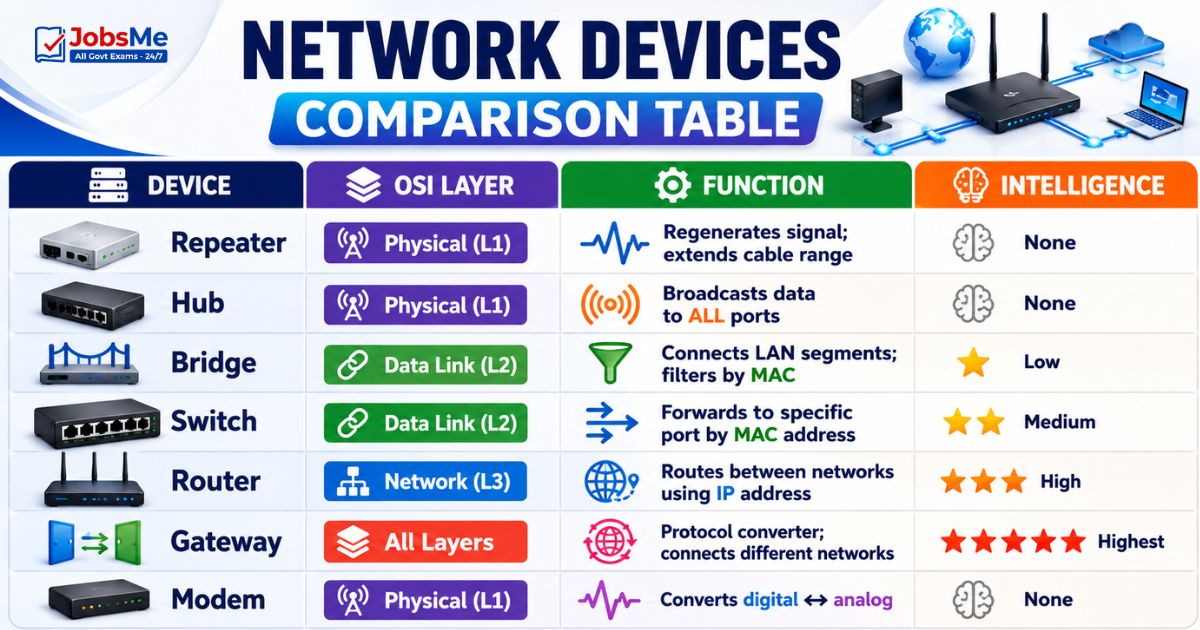
| Device | OSI Layer | Function | Intelligence |
|---|---|---|---|
| Repeater | Physical (L1) | Regenerates signal; extends cable range | None |
| Hub | Physical (L1) | Broadcasts data to ALL ports | None |
| Bridge | Data Link (L2) | Connects LAN segments; filters by MAC | Low |
| Switch | Data Link (L2) | Forwards to specific port by MAC address | Medium |
| Router | Network (L3) | Routes between networks using IP address | High |
| Gateway | All Layers | Protocol converter; connects different networks | Highest |
| Modem | Physical (L1) | Converts digital ↔ analog | None |
Network Topology
Network Topology refers to the physical or logical arrangement of computers (nodes) and connecting cables in a network. Topology affects network performance, scalability, fault tolerance, and cost.
Node = any device connected to the network (computer, printer, switch)
Bus Topology
| Feature | Details |
|---|---|
| Structure | All nodes connected to a single central cable called the bus or backbone |
| Data flow | Data travels along the cable in both directions; every node receives every transmission |
| Terminator | Both ends of the cable must have terminators to prevent signal reflection |
| Advantage | Simple to install; inexpensive; uses less cable |
| Disadvantage | Single point of failure — if the main cable breaks, entire network fails; difficult to troubleshoot |
| Exam Key | Bus = single cable backbone; simple but fragile |
Star Topology
| Feature | Details |
|---|---|
| Structure | All nodes connected individually to a central hub or switch |
| Data flow | All data passes through the central hub/switch |
| Advantage | Most popular topology; easy to add/remove devices; easy to troubleshoot; one device failure doesn't affect others |
| Disadvantage | If the central hub fails, entire network fails; requires more cable than bus |
| Central device | Hub (older) or Switch (modern) |
| Exam Key | Star = central hub; most popular topology; hub/switch at centre |
Ring Topology
| Feature | Details |
|---|---|
| Structure | Each node connected to exactly two neighbours forming a circular path |
| Data flow | Data travels in one direction around the ring (or both in dual-ring) as a Token |
| Token | A small data frame that circulates; a node can only send data when it holds the token |
| Technology | Token Ring, FDDI (Fibre Distributed Data Interface) |
| Advantage | Equal access for all nodes; predictable performance |
| Disadvantage | A single node failure can break the entire ring; slower than star |
| Exam Key | Ring = circular; uses Token; Token Ring/FDDI technology |
Mesh Topology
| Feature | Details |
|---|---|
| Structure | Every node is connected directly to every other node |
| Data flow | Multiple paths between any two nodes; data takes the shortest available path |
| Types | Full Mesh (every device to every other) and Partial Mesh (only some devices fully connected) |
| Advantage | Most reliable topology; no single point of failure; data can reroute around failures |
| Disadvantage | Most expensive — requires the most cable and network cards; very complex |
| Used in | Internet backbone, military networks, critical infrastructure |
| Exam Key | Mesh = every node connected to all others; most reliable; most expensive; point-to-point |
Tree Topology
| Feature | Details |
|---|---|
| Structure | Hierarchical arrangement — a root node at the top connected to lower-level nodes in branches |
| Also called | Hierarchical Topology |
| Structure | Like an inverted tree or organisational chart |
| Advantage | Scalable; easy to manage hierarchically |
| Disadvantage | Root node failure affects the whole network |
| Used in | Large organisations with hierarchical structure (bank headquarters → regional offices → branches) |
| Exam Key | Tree = hierarchical; root node at top |
Hybrid Topology
| Feature | Details |
|---|---|
| Structure | Combination of two or more different topologies in a single network |
| Advantage | Flexible; can be designed to meet specific needs |
| Used in | Most real-world enterprise networks — typically a combination of star and bus, or star and ring |
| Exam Key | Hybrid = mix of topologies; used in most enterprise networks |
Topology Comparison Table
| Topology | Structure | Key Feature | Failure Risk | Cost |
|---|---|---|---|---|
| Bus | Single cable | Simple; linear | High (cable breaks = all fail) | Low |
| Star | Central hub/switch | Most popular | Medium (hub fails = all fail) | Medium |
| Ring | Circular; token | Equal access | High (one node = all affected) | Medium |
| Mesh | Every node connected | Most reliable | Low (multiple paths) | High |
| Tree | Hierarchical | Scalable | Medium (root node critical) | Medium |
| Hybrid | Mixed | Flexible | Varies | Varies |
Wi-Fi Standards (IEEE 802.11)
Wi-Fi is wireless LAN technology based on the IEEE 802.11 standard family. Each generation brings higher speeds, better efficiency, and new capabilities.
| Standard | Wi-Fi Name | Frequency | Maximum Speed | Year |
|---|---|---|---|---|
| 802.11b | Wi-Fi 1 | 2.4 GHz | 11 Mbps | 1999 |
| 802.11a | Wi-Fi 2 | 5 GHz | 54 Mbps | 1999 |
| 802.11g | Wi-Fi 3 | 2.4 GHz | 54 Mbps | 2003 |
| 802.11n | Wi-Fi 4 | 2.4/5 GHz | 600 Mbps | 2009 |
| 802.11ac | Wi-Fi 5 | 5 GHz | 3.5 Gbps | 2013 |
| 802.11ax | Wi-Fi 6 | 2.4/5 GHz | 9.6 Gbps | 2019 |
| 802.11ax (6 GHz band) | Wi-Fi 6E | 6 GHz (extended) | 9.6 Gbps | 2021 |
| 802.11be | Wi-Fi 7 | 2.4/5/6 GHz | 46 Gbps | 2024 |
Key Wi-Fi Facts for Exams:
- Wi-Fi 4, 5, 6, and 7 are the four most-tested standards
- Wi-Fi 6E extends Wi-Fi 6 to the 6 GHz band for less congestion
- Wi-Fi 7 (802.11be) is the latest standard (2024) — 46 Gbps theoretical max
- WPA3 (Wi-Fi Protected Access 3) is the latest Wi-Fi security standard
Bluetooth and Other Wireless Technologies
| Technology | Range | Speed | Purpose |
|---|---|---|---|
| Bluetooth | ~10 metres (up to 100m for Class 1) | Up to 3 Mbps (Classic); up to 2 Mbps (BLE) | Creates PAN; connects headphones, keyboards, phones, speakers |
| Bluetooth 5.3/5.4 | Improved | Faster | Latest Bluetooth version — improved range and speed |
| NFC (Near Field Communication) | <4 cm | Low | Contactless payments (Google Pay, Apple Pay), door access |
| Infrared (IR) | Line-of-sight; short | Low | TV remotes, old wireless speakers |
| Zigbee | ~10-100 m | Low (250 kbps) | IoT devices, smart home sensors |
| Z-Wave | ~30 m | Low | Smart home automation |
| LoRaWAN | Several km | Very low | IoT sensors over long distances (smart city, agriculture) |
Bluetooth Key Facts:
- Creates a PAN (Personal Area Network)
- Uses 2.4 GHz ISM radio frequency band
- Latest version: Bluetooth 5.4
- Low Energy version: BLE (Bluetooth Low Energy) — used in fitness bands, IoT sensors
Ethernet - The LAN Standard
Ethernet is the most widely used wired LAN technology. It was invented by Robert Metcalfe and David Boggs at Xerox PARC in 1973.
| Feature | Details |
|---|---|
| Inventor | Robert Metcalfe and David Boggs |
| Original Speed | 10 Mbps |
| Original Topology | Bus topology |
| Address | Each device has a 48-bit MAC address |
| Fast Ethernet | 100 Mbps |
| Gigabit Ethernet | 1000 Mbps (1 Gbps) |
| 10GbE | 10 Gbps — used in data centres |
| Modern use | Uses Star topology with central switch (not original bus) |
Packet Switching vs Circuit Switching:
| Type | How It Works | Used In |
|---|---|---|
| Packet Switching | Data broken into small packets; each packet travels independently; reassembled at destination | Internet, Ethernet |
| Circuit Switching | Dedicated communication path established for the entire duration of the call | Traditional telephone (PSTN) |
Key Networking Terms:
| Term | Meaning |
|---|---|
| Bandwidth | Maximum data that can travel through a network path per second; measured in bps or Hz |
| Throughput | Actual data successfully transmitted per second; always ≤ bandwidth |
| Latency | Time delay between sending and receiving data; measured in milliseconds |
| SSID | Service Set Identifier — the name of a Wi-Fi network |
| IP Address | Unique numerical address identifying every device on a network |
| MAC Address | Hardware address of a NIC; 48-bit; unique worldwide; assigned at manufacture |
| PSTN | Public Switched Telephone Network — traditional telephone network |
| ISDN | Integrated Services Digital Network — carries voice, video, and data digitally over telephone lines |
Memory Tricks
🔑 Network Types - Coverage Order (Small to Large):
"Please Let Me See Wide Campus Storage" PAN → LAN → MAN → See(WAN) → WAN → CAN → SAN Simpler: PAN < LAN < CAN < MAN < WAN
🔑 Network Devices - OSI Layers:
"Repeaters Have Big Switches Routing Gateways" Repeater=L1 | Hub=L1 | Bridge=L2 | Switch=L2 | Router=L3 | Gateway=All Key: Router = Layer 3 (most tested); Hub = broadcasts ALL
🔑 Hub vs Switch - Easy Difference:
Hub = Hollering to everyone (broadcasts to ALL) Switch = Selectively sends (to specific port only)
🔑 Modem = MOdulator + DEModulator:
Modem takes digital → makes it analog (for phone line) → and reverses incoming analog → back to digital "Modulates Demodulates"
🔑 Topology Summary:
Bus = Bone (single backbone cable) Star = Sun (all connect to centre) Ring = Round (circular) Mesh = Maximum connections Tree = Tier (hierarchical)
🔑 Wi-Fi Standards - Speed Order:
Wi-Fi 4 (600Mbps) → Wi-Fi 5 (3.5Gbps) → Wi-Fi 6 (9.6Gbps) → Wi-Fi 7 (46Gbps) Trick: "4, 5, 6, 7 — each is faster than before"
🔑 ARPANET → Internet Father:
ARPANET (1969) → Vint Cerf (Father of Internet) → TCP/IP → Modern Internet
One-Liner Recap (Quick Revision)
- A computer network is a collection of two or more computers connected together to share information, resources, and services through wired or wireless media.
- ARPANET (1969) was the world's first packet-switching network and the direct predecessor of the modern Internet, developed by the US Department of Defense.
- Vint Cerf is called the Father of the Internet for co-developing the TCP/IP protocol suite that became the universal language of the Internet.
- PAN (Personal Area Network) covers approximately 10 metres using Bluetooth/USB and connects personal devices like phones, laptops, and wireless earbuds.
- LAN (Local Area Network) covers a single building or campus using Ethernet/Wi-Fi — it is the most commonly used network type with the highest speed and lowest cost.
- MAN (Metropolitan Area Network) covers a city or town — Cable TV networks are a classic example of MAN technology.
- WAN (Wide Area Network) covers the largest geographical area — the Internet is the world's largest public WAN.
- In a Peer-to-Peer (P2P) network every computer is both a client and server; in a Client-Server network a dedicated powerful server serves multiple clients.
- A Hub broadcasts incoming data to ALL connected ports (Physical Layer 1), while a Switch intelligently forwards data only to the specific destination port (Data Link Layer 2).
- A Router is the most intelligent networking device — it routes data packets between different networks using IP addresses and operates at Network Layer 3 of the OSI model.
- A Gateway is a protocol converter that connects two networks using different communication protocols and operates at all seven layers of the OSI model.
- A Modem (MOdulator-DEModulator) converts digital signals to analog for transmission over telephone lines and converts incoming analog signals back to digital.
- Star Topology is the most popular network topology — all devices connect to a central hub or switch, making it easy to add devices and troubleshoot problems.
- Mesh Topology is the most reliable topology — every node connects directly to every other node, providing multiple redundant paths so there is no single point of failure.
- Wi-Fi 7 (IEEE 802.11be, 2024) is the latest Wi-Fi standard with a theoretical maximum speed of 46 Gbps, while Wi-Fi 6 (802.11ax) offers 9.6 Gbps.
Preparing for competitive exams requires consistent revision. Platforms like JobsMe simplify preparation through:
- Daily Current Affairs
- Weekly Current Affairs
- Monthly Current Affairs
- Static GK for Competitive Exams
- Latest Government Jobs Notifications
- Banking Awareness
Stay updated, revise regularly, and attempt quizzes for better accuracy in UPSC, SSC CGL, IBPS PO/Clerk, SBI, RBI Grade B, RRB NTPC, Defence, and State PSC exams.
Free quiz • No signup required
Put this topic into practice with Daily Current Affairs Quiz 9 June 2026 MCQs for UPSC, SSC, Banking, Railways, Defence & State PSC Exams. It is the quickest way to reinforce what you just learned.
Frequently Asked Questions
What is the difference between LAN, MAN, and WAN?
What is the difference between a Hub and a Switch?
What does a Router do and how is it different from a Switch?
What is the difference between Bus, Star, and Mesh topology?
What is ARPANET and how is it related to the Internet?
What is the difference between Wi-Fi 6 and Wi-Fi 7?

About the author