Computer Languages – Complete Notes for IBPS, SSC, RRB & Govt Exams
Computer Languages is a regularly tested chapter in IBPS, SSC CGL, RRB NTPC, and all state government exams. This post covers the complete classification of programming languages — Machine Language, Assembly Language, High-Level Languages with their inventors and years, all three translators (Assembler, Interpreter, Compiler), generations of languages, types of errors, and Object-Oriented Programming — with memory tricks, one-liners, and 10 exam-focused FAQs.
Jump to section
- Introduction: Why Computer Languages is a High-Scoring Chapter
- What is a Computer Language?
- Low-Level Languages
- Medium-Level Language
- High-Level Languages (HLL)
- Generations of Programming Languages (1GL to 5GL)
- Language Translators
- Types of Programming Errors (Bugs)
- Object-Oriented Programming (OOP)
- Key Programming Terms
- Memory Tricks
- One-Liner Recap (Quick Revision)
Introduction: Why Computer Languages is a High-Scoring Chapter
Every computer works because someone wrote a program — a set of instructions — in a language the machine can understand. Computer Languages is the bridge between human thinking and machine execution.
In government job exams, this chapter is tested in multiple ways:
- "Which language is directly understood by the computer?" → Machine Language
- "FORTRAN was developed by ___" → IBM, 1957
- "Which translator converts HLL to machine language line by line?" → Interpreter
- "Which language is used for AI?" → LISP, Python
- "What does OOP stand for?" → Object-Oriented Programming
- "A program error that runs but gives wrong results is called ___" → Logical Error
Questions from this chapter are mostly factual and direct — making them easy to score if you have the key details memorised. The chapter also forms the conceptual foundation for understanding Software (Chapter 9) and Operating Systems (Chapter 10).
This post gives you the complete picture — every language category, every important language with its inventor and year, all three translators compared side-by-side, all four error types, and the full OOP concept — all in one place.
What is a Computer Language?
A computer language (or programming language) is a formal set of rules, symbols, and vocabulary used to write instructions (programs) that a computer can understand and execute.
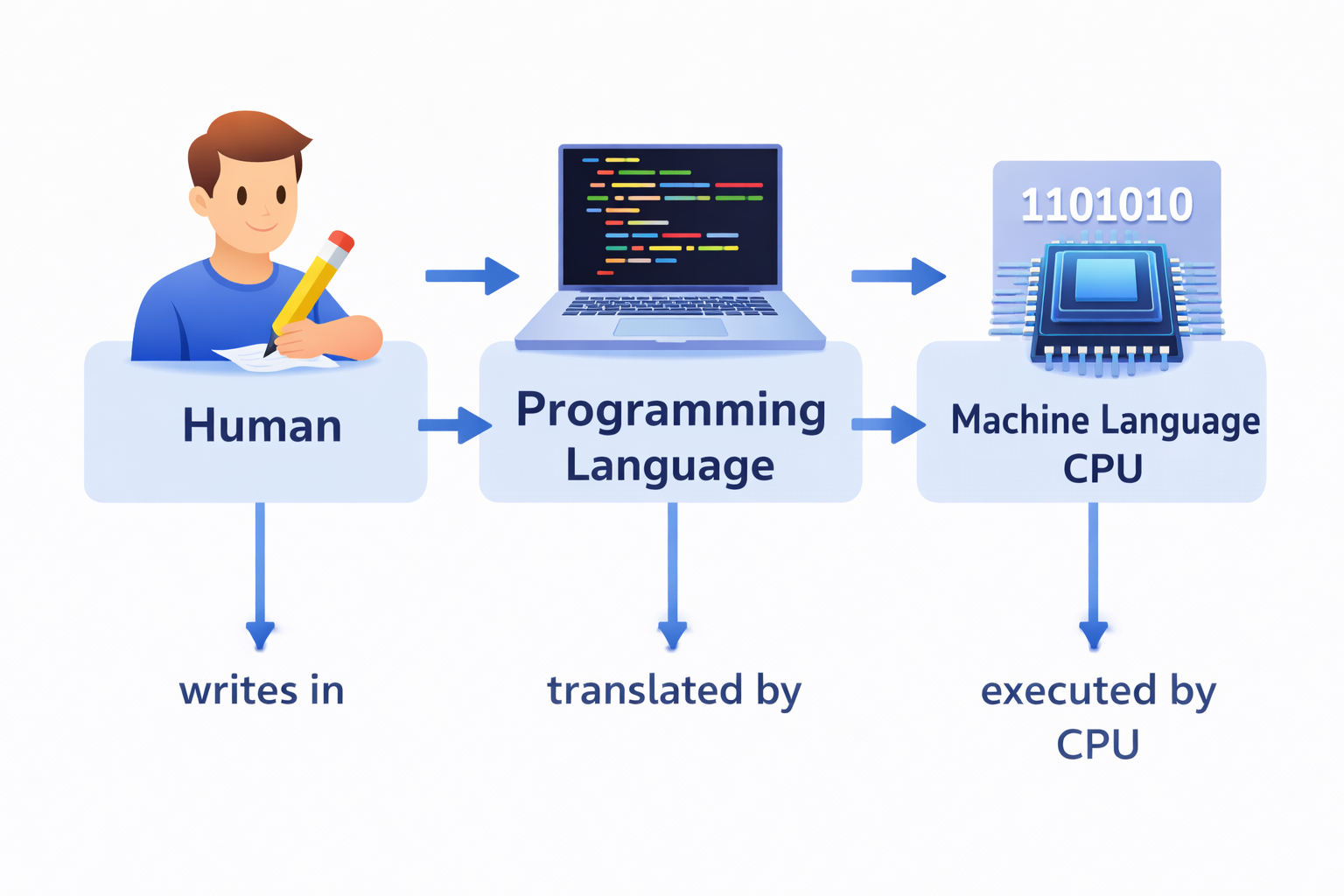
Why do we need programming languages? A computer's CPU only understands machine language (binary — 0s and 1s). Humans find it nearly impossible to write programs in binary. Programming languages provide a middle ground — they allow humans to write programs in a more understandable form, which is then translated into machine language for the computer to execute.
Key Relationship:
Low-Level Languages
Low-Level Languages (LLL) are programming languages that are very close to the hardware — they deal directly with the computer's physical components. They are difficult for humans to understand but easy for the machine to process.
Machine Language (1GL - First Generation Language)
Machine Language is the only language a computer directly understands without any translation.
| Feature | Details |
|---|---|
| Generation | 1GL (First Generation Language) |
| Representation | Binary (0s and 1s) — sequences of bits |
| Example | 10110000 01100001 (an x86 instruction to move a value) |
| Machine dependent? | Yes — a program written for one CPU type will not work on another |
| Human readable? | No — extremely difficult to read, write, or debug |
| Speed | Fastest — no translation needed |
| Error detection | Very difficult — no error messages |
Advantage: Maximum speed — no translation step needed, CPU executes directly. Disadvantage: Nearly impossible for humans to write or understand; completely machine-specific.
Assembly Language (2GL - Second Generation Language)
Assembly Language was developed to make programming slightly easier by replacing binary codes with short, symbolic codes called mnemonics.
| Feature | Details |
|---|---|
| Generation | 2GL (Second Generation Language) |
| Representation | Mnemonic codes — short symbolic abbreviations |
| Example | MOV AX, 5 (instead of binary to move value 5 into register AX) |
| Machine dependent? | Yes — still specific to a particular CPU architecture |
| Human readable? | Slightly — mnemonics are abbreviated English words |
| Translator needed | Assembler converts assembly → machine language |
Common Mnemonic Examples:
- ADD — Addition
- MOV — Move data
- SUB — Subtraction
- JMP — Jump to an address
- CMP — Compare two values
Advantage over Machine Language: Much easier to write and debug; mnemonics are memorable. Disadvantage: Still machine-dependent; still difficult for complex applications.
Medium-Level Language
Medium-Level Languages act as a bridge between low-level (hardware-close) and high-level (human-friendly) languages. They provide both low-level hardware control and high-level readability.
| Feature | Details |
|---|---|
| Key Example | C language (1972, Dennis Ritchie, Bell Labs) |
| Why "medium"? | C can directly manipulate hardware (memory addresses, pointers) like low-level, but is written in a readable syntax like high-level |
| Use case | System programming — operating systems (Unix, Linux, Windows kernel), device drivers, embedded systems |
C is used to write operating system kernels — Linux is written in C. This dual capability makes it uniquely powerful.
High-Level Languages (HLL)
High-Level Languages (HLL) are designed to be close to human language — they use English-like syntax and abstract away hardware details. They are:
- Easy to read, write, and understand
- Platform-independent (mostly) — the same code can run on different computers
- Require a translator (Compiler or Interpreter) to convert to machine language
Important High-Level Languages - Inventor, Year & Purpose
This table is extremely important for exams — questions about language inventors and years appear repeatedly:
| Language | Year | Developer / Inventor | Primary Application |
|---|---|---|---|
| FORTRAN | 1957 | IBM team | Scientific and mathematical calculation — FORmula TRANslation |
| ALGOL | 1958 | European and American scientists | Scientific computing; algorithmic language |
| LISP | 1958 | John McCarthy (MIT) | Artificial Intelligence — List Processing |
| COBOL | 1959 | Grace Hopper | Business management and data processing — Common Business Oriented Language |
| BASIC | 1964 | Kemeny & Kurtz (Dartmouth College) | Education — Beginner's All-purpose Symbolic Instruction Code |
| Pascal | 1970 | Niklaus Wirth | Education and structured programming |
| C | 1972 | Dennis Ritchie (Bell Labs) | System programming, OS development |
| C++ | 1985 | Bjarne Stroustrup (Bell Labs) | Object-oriented system programming |
| Java | 1995 | James Gosling (Sun Microsystems) | Internet applications; platform-independent ("Write Once, Run Anywhere") |
| Python | 1991 | Guido van Rossum | AI/ML, Data Science, Web, Automation — most popular language today |
| Swift | 2014 | Apple | iOS and macOS app development |
| Kotlin | 2011 | JetBrains / Google | Android app development (official language) |
| Rust | 2015 | Mozilla | Systems programming with memory safety |
| Go (Golang) | 2009 | Cloud services, backend development | |
| JavaScript | 1995 | Brendan Eich (Netscape) | Interactive web pages (front-end web development) |
| PHP | 1994 | Rasmus Lerdorf | Server-side web development |
| SQL | 1974 | IBM (Donald Chamberlin & Ray Boyce) | Database querying and management |
Key Inventors to Memorise for Exams:
| Person | Language/Achievement |
|---|---|
| Grace Hopper | COBOL (1959) — also invented the first compiler |
| Dennis Ritchie | C language (1972) |
| Bjarne Stroustrup | C++ (1985) |
| James Gosling | Java (1995) |
| Guido van Rossum | Python (1991) |
| John McCarthy | LISP (1958); coined the term "Artificial Intelligence" |
| John von Neumann | Early programming concepts and computer architecture |
Generations of Programming Languages (1GL to 5GL)
| Generation | Name | Description | Examples |
|---|---|---|---|
| 1GL | Machine Language | Binary (0s and 1s); directly executed by CPU | Binary code |
| 2GL | Assembly Language | Mnemonic codes; needs an Assembler | Assembly, Mnemonic codes |
| 3GL | High-Level Language | English-like syntax; needs Compiler/Interpreter | C, C++, Java, Python, FORTRAN |
| 4GL | Fourth Generation Language | Human-like statements; close to natural language; used in databases | SQL, MATLAB, R |
| 5GL | Fifth Generation Language | Visual/declarative programming; AI-based problem solving | Visual Basic, Prolog, Mercury |
Key Evolution: Each generation moves further from the machine and closer to human language — making programming easier but requiring more powerful translation tools.
Language Translators
A translator is a system software tool that converts a program written in one language into another language — specifically, it converts higher-level human-written code into machine language that the CPU can execute.
There are three types of translators:
Assembler
| Feature | Details |
|---|---|
| Converts | Assembly language (2GL) → Machine language |
| Input | Assembly code (using mnemonics) |
| Output | Object code (machine language binary) |
| Translation method | Translates the entire program at once |
| Speed | Fast translation |
The Assembler is the first translator in computer history — it enabled programmers to move from pure binary to symbolic mnemonics.
Interpreter
| Feature | Details |
|---|---|
| Converts | High-Level Language (HLL) → Machine language |
| Translation method | Line by line — translates and executes one statement at a time |
| Error reporting | Stops at the first error — does not continue until the error is fixed |
| Object code | Not saved — translates fresh every time the program runs |
| Speed | Slower execution (translates while running) |
| Best for | Debugging and interactive programming |
| Used by | Python (default), Ruby, JavaScript |
Compiler
| Feature | Details |
|---|---|
| Converts | High-Level Language (HLL) → Machine language |
| Translation method | Translates the entire program at once before execution begins |
| Error reporting | Reports ALL errors with line numbers — programmer can fix all at once |
| Object code | Saved as an executable file — no need to recompile for each run |
| Speed | Faster execution (compiled code runs at near-machine speed) |
| Best for | Production software, performance-critical applications |
| Used by | C, C++, Java (to bytecode), Rust, Go |
Assembler vs Interpreter vs Compiler - Key Comparison
| Feature | Assembler | Interpreter | Compiler |
|---|---|---|---|
| Converts | Assembly → Machine | HLL → Machine | HLL → Machine |
| Method | Whole program | Line by line | Whole program |
| Error reporting | — | Stops at first error | All errors at once |
| Object code | Yes | No | Yes |
| Speed of execution | Fastest | Slowest | Fast |
| Memory | Less | More (translates each time) | More (stores object code) |
| Examples | NASM, MASM | Python, Ruby, JavaScript | GCC (C), g++ (C++), javac (Java) |
Exam Tip — Key Distinctions:
- Interpreter = Line by line + Stops at first error + No object code saved
- Compiler = Whole program + All errors reported + Object code saved
Types of Programming Errors (Bugs)
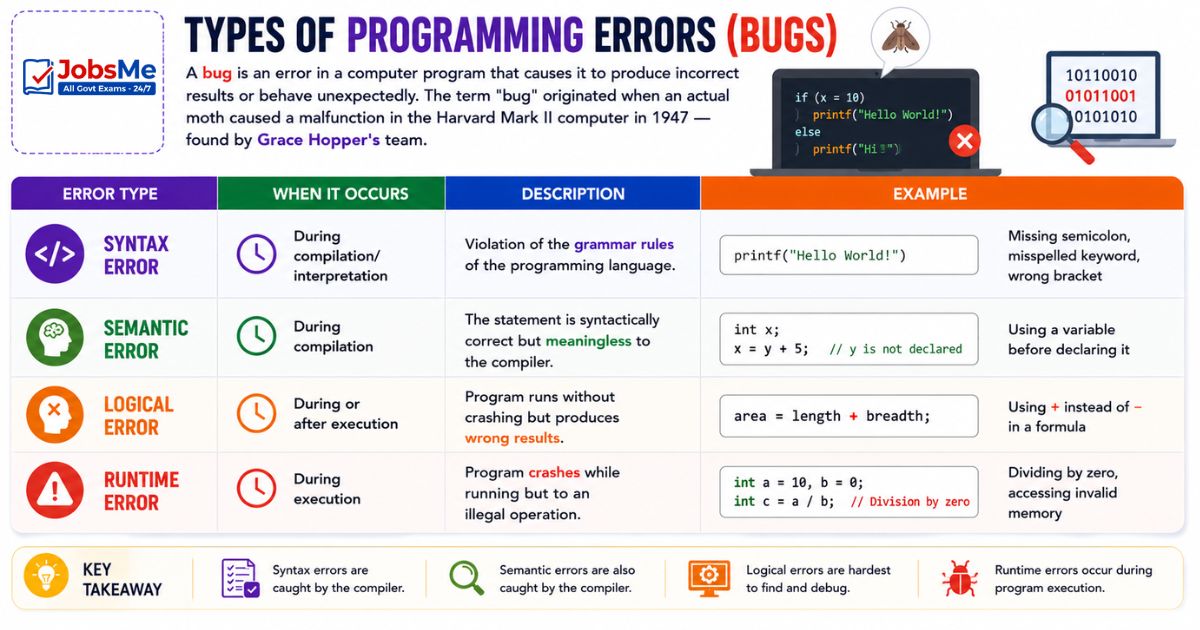
A bug is an error in a computer program that causes it to produce incorrect results or behave unexpectedly. The term "bug" originated when an actual moth caused a malfunction in the Harvard Mark II computer in 1947 — found by Grace Hopper's team.
| Error Type | When It Occurs | Description | Example |
|---|---|---|---|
| Syntax Error | During compilation/interpretation | Violation of the grammar rules of the programming language | Missing semicolon, misspelled keyword, wrong bracket |
| Semantic Error | During compilation | The statement is syntactically correct but meaningless to the compiler | Using a variable before declaring it |
| Logical Error | During or after execution | Program runs without crashing but produces wrong results | Using + instead of − in a formula |
| Runtime Error | During execution | Program crashes while running due to an illegal operation | Dividing by zero, accessing invalid memory |
Debugging — The process of finding, analysing, and fixing bugs in a program. Grace Hopper is often credited with popularising the term.
Object-Oriented Programming (OOP)
Object-Oriented Programming (OOP) is a programming paradigm that organises software as a collection of objects — each object combines data (attributes) and the functions (methods) that operate on that data.
In OOP, instead of writing a list of instructions to execute, you define objects that represent real-world entities and how they interact.
Core Concepts:
- Class — A blueprint or template for creating objects (like a cookie cutter)
- Object — An instance of a class (like a cookie made from the cutter)
- Attribute — Data/properties of an object (e.g., a car's colour, speed, brand)
- Method — Functions that an object can perform (e.g., a car's start(), stop(), accelerate())
Four Pillars of OOP
| Pillar | Description | Example |
|---|---|---|
| Encapsulation | Bundling data and methods together inside an object; hiding internal details | A capsule that contains medicine — you use it without knowing the formula |
| Abstraction | Showing only essential features; hiding unnecessary complexity | Using a TV remote without knowing the internal circuit |
| Inheritance | A new class can inherit (reuse) properties and methods of an existing class | A "Car" class inheriting from a "Vehicle" class |
| Polymorphism | Same method name behaves differently for different objects | A "draw()" method draws a circle for a Circle object and a rectangle for a Rectangle object |
OOP Languages
The following programming languages support Object-Oriented Programming:
| Language | OOP Support | Primary Use |
|---|---|---|
| Java | Full OOP | Web/enterprise applications, Android |
| C++ | OOP + Procedural | System programming, games |
| Python | OOP + Multi-paradigm | AI/ML, Data Science, Web |
| C# | Full OOP | Windows applications, game development (Unity) |
| PHP | OOP + Procedural | Web development |
| Ruby | Full OOP | Web development (Ruby on Rails) |
| Dart | Full OOP | Flutter/mobile apps |
| Swift | OOP + Functional | iOS/macOS apps |
| Kotlin | OOP + Functional | Android apps |
Key Programming Terms
| Term | Meaning |
|---|---|
| Algorithm | A step-by-step, ordered set of instructions for solving a specific problem — the logic before writing code |
| Flowchart | A visual/graphical diagram that represents the steps of an algorithm using standard symbols |
| Pseudocode | An informal, human-readable description of a program's logic — not a real language, not machine-executable |
| Debugging | The process of identifying, analysing, and fixing errors (bugs) in a program |
| Reserved Words / Keywords | Words that the programming language has set aside for its own use — cannot be used as variable names (e.g., if, while, class, return) |
| Variable | A named storage location in memory that holds a value which can change during program execution |
| Loop | A programming construct that executes a set of statements repeatedly until a condition is met |
| Function / Method | A named, reusable block of code that performs a specific task |
| Object Code | The output produced by a compiler — machine language that the CPU can execute |
| Source Code | The human-written program code in a programming language |
| Scripting Language | A high-level language that is interpreted rather than compiled; typically used for automating tasks (e.g., JavaScript, Python, Perl, Bash) |
| IDE (Integrated Development Environment) | A software application that provides tools for writing, debugging, and running code (e.g., Visual Studio Code, IntelliJ, PyCharm) |
| API (Application Programming Interface) | A set of rules and tools that allows different software applications to communicate with each other |
Memory Tricks
🔑 Language Levels — Low to High:
"Machine Asks High Questions" = Machine → Assembly → High Level Or simply: LLL (Low Level Language) → MLL (Medium) → HLL (High Level)
🔑 HLL Inventors — Key ones to memorise:
"Grace Helped Code Better" = Grace Hopper → COBOL "Dennis Really Coded" = Dennis Ritchie → C (at Bell Labs) "James Got Java" = James Gosling → Java (Sun Microsystems) "Guido's Python Grew" = Guido van Rossum → Python
🔑 Language Year Sequence (Chronological):
FORTRAN(1957) → ALGOL/LISP/COBOL(1958-59) → BASIC(1964) → Pascal(1970) → C(1972) → C++(1985) → Python(1991) → Java(1995)
🔑 Translators — Key Differences:
Interpreter = "I work Instantly, Instruction by instruction, but I Stop at errors" Compiler = "I Collect ALL errors, Compile everything first, then you run"
🔑 OOP Pillars — "EIAP":
Encapsulation | Inheritance | Abstraction | Polymorphism Mnemonic: "Every Indian Achieves Progress"
🔑 Error Types — "SSLR":
Syntax → Semantic → Logical → Runtime Mnemonic: "Students Sometimes Learn Really"
One-Liner Recap (Quick Revision)
- A computer language is a formal set of rules and vocabulary used to write instructions (programs) that a computer can understand, ranging from binary machine language to human-friendly high-level languages.
- Machine Language (1GL) is the only language directly understood by the CPU — it consists entirely of binary (0s and 1s) and is completely machine-dependent.
- Assembly Language (2GL) uses symbolic mnemonic codes (like ADD, MOV, SUB) instead of binary and requires an Assembler to translate it to machine language.
- High-Level Languages (HLL) use English-like syntax, are platform-independent, and require either a Compiler or Interpreter to translate to machine language.
- FORTRAN (1957, IBM) was the first high-level language, designed for scientific calculations; COBOL (1959, Grace Hopper) was designed for business management.
- LISP (1958, John McCarthy, MIT) is the oldest AI language; Python (1991, Guido van Rossum) is today's most popular AI/ML and general-purpose language.
- Java (1995, James Gosling, Sun Microsystems) introduced the "Write Once, Run Anywhere" concept through the Java Virtual Machine (JVM), making it truly platform-independent.
- An Assembler converts Assembly Language to Machine Language; an Interpreter converts HLL to machine language line by line; a Compiler converts the entire HLL program at once.
- An Interpreter stops at the first error it encounters and executes line by line without saving object code, making it best for debugging and interactive programming.
- A Compiler translates the entire program, reports all errors together with line numbers, saves the object code as an executable, making compiled programs run faster.
- Syntax errors occur when programming grammar rules are violated; Logical errors occur when the program runs correctly but produces wrong results; Runtime errors crash the program during execution.
- Object-Oriented Programming (OOP) organises software as objects — each object combines data (attributes) and functions (methods) — and is based on four pillars: Encapsulation, Inheritance, Abstraction, and Polymorphism.
- Inheritance in OOP allows a new class to reuse properties and methods of an existing class, reducing code duplication and promoting code reusability.
- A 4GL (Fourth Generation Language) uses human-like statements close to natural language and is primarily used for database operations — SQL is the most important example.
- A scripting language is interpreted and executed one command at a time, used for automating tasks; JavaScript (web), Python (automation), and Bash (Linux scripting) are key examples.
Preparing for competitive exams requires consistent revision. Platforms like JobsMe simplify preparation through:
- Daily Current Affairs
- Weekly Current Affairs
- Monthly Current Affairs
- Static GK for Competitive Exams
- Latest Government Jobs Notifications
- Banking Awareness
Stay updated, revise regularly, and attempt quizzes for better accuracy in UPSC, SSC CGL, IBPS PO/Clerk, SBI, RBI Grade B, RRB NTPC, Defence, and State PSC exams.
Free quiz • No signup required
Put this topic into practice with Daily Current Affairs Quiz 9 June 2026 MCQs for UPSC, SSC, Banking, Railways, Defence & State PSC Exams. It is the quickest way to reinforce what you just learned.
Frequently Asked Questions
What is the difference between Low-Level and High-Level languages?
Which programming language is used for Artificial Intelligence?
What is the difference between a Compiler and an Interpreter?
Who invented COBOL and what is it used for?
What is Object-Oriented Programming (OOP) and what are its four pillars?
What is Java and why is it called platform-independent?

About the author