Data Representation & Number Systems – Complete Notes for IBPS, SSC, RRB & Govt Exams
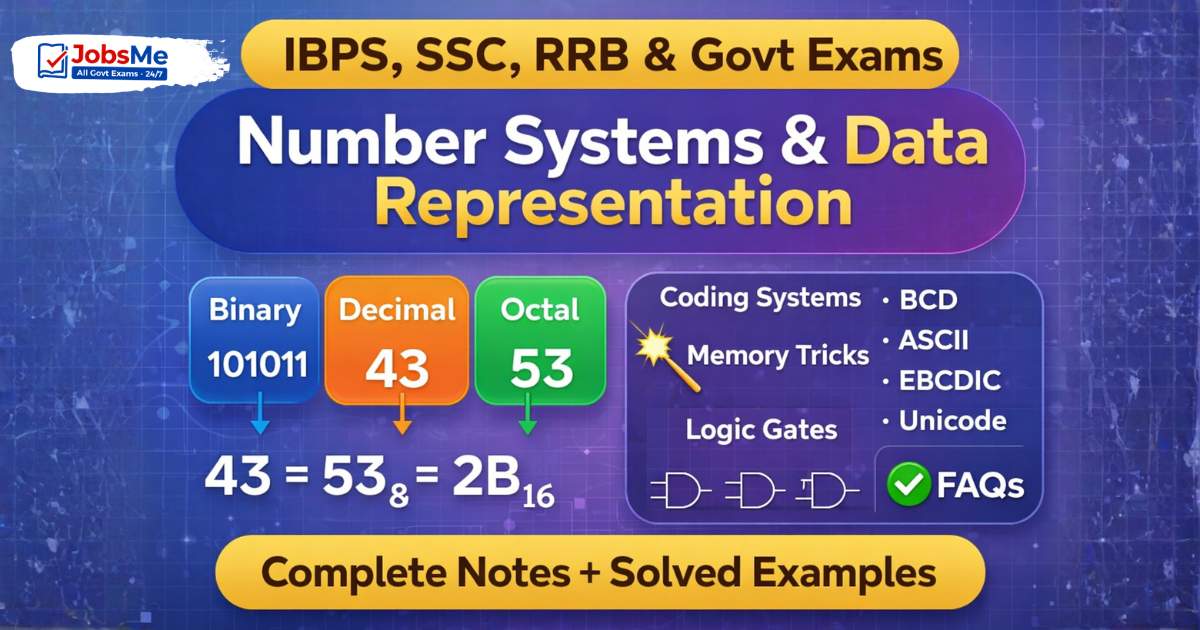
Number Systems and Data Representation is a guaranteed scoring topic in IBPS, SSC CGL, RRB NTPC, and other government exams. This post covers all four number systems (Binary, Decimal, Octal, Hexadecimal), step-by-step conversion methods with solved examples, coding systems (BCD, ASCII, EBCDIC, Unicode), and Logic Gates — with memory tricks, one-liners, and 10 exam-focused FAQs.
Jump to section
Introduction: Why Number Systems Matter in Govt Exams
Number Systems and Data Representation is one of the most scoring topics in Computer Awareness — but only if you understand the logic behind conversions, because exam questions are not always straightforward. They test your ability to convert numbers between systems quickly and accurately.
In exams like IBPS PO, IBPS Clerk, SBI Clerk, SSC CGL, RRB NTPC, and LIC AAO, this chapter appears as:
- Direct conversion MCQs: "Convert (43)₁₀ to binary" → (101011)₂
- Coding system MCQs: "ASCII-7 can represent ___ characters" → 128
- Logic gate MCQs: "Which gate gives output 1 only when both inputs are 1?" → AND Gate
- Coding identification: "Which code is used by banks to read cheques?" → MICR (ties to Chapter 4)
- "Which are called Universal Gates?" → NAND and NOR
This chapter also forms the mathematical foundation of computer science — everything inside a computer is ultimately represented in binary (0s and 1s). Understanding why and how this works gives you a massive advantage in every computer awareness topic that follows.
This post covers all four number systems, every conversion method with worked examples, all four coding systems, and all seven logic gates — completely exam-ready.
How Computers Represent Data Internally
Computers are electronic devices — their basic electronic components (transistors) have only two stable states: ON (1) and OFF (0). This is why computers use the Binary Number System — it maps perfectly to the physical reality of electronic circuits.
Why can't computers use decimal? Decimal requires distinguishing between 10 different voltage levels (0-9). This is extremely difficult to implement reliably in electronic circuits. Binary only requires distinguishing between 2 states (0 and 1 — low voltage and high voltage), making it far more reliable and practical.
Data Representation in Computers:
| Data Type | How It Is Stored |
|---|---|
| Numbers | Binary (0s and 1s) |
| Text/Characters | ASCII or Unicode binary codes |
| Images | Binary representation of pixel colours |
| Audio | Binary representation of sound wave samples |
| Video | Binary representation of image frames + audio |
Everything — your messages, photos, videos, bank records, emails — is ultimately stored as sequences of 0s and 1s in the computer's memory.
Types of Number Systems
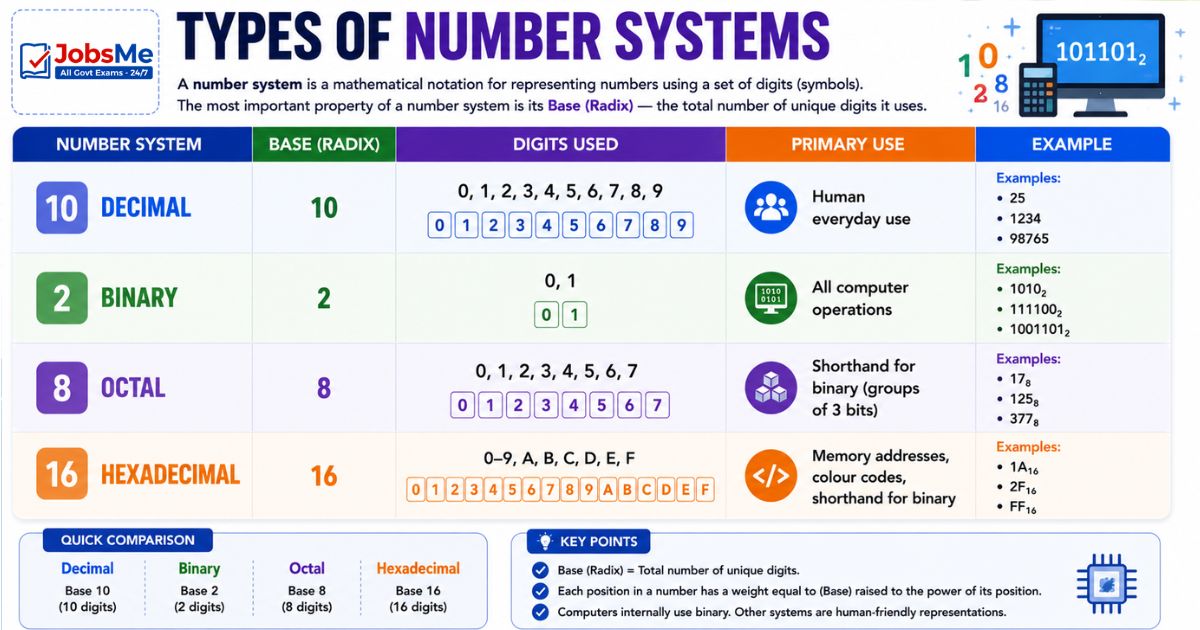
A number system is a mathematical notation for representing numbers using a set of digits (symbols). The most important property of a number system is its Base (Radix) — the total number of unique digits it uses.
| Number System | Base | Digits Used | Primary Use |
|---|---|---|---|
| Decimal | 10 | 0, 1, 2, 3, 4, 5, 6, 7, 8, 9 | Human everyday use |
| Binary | 2 | 0, 1 | All computer operations |
| Octal | 8 | 0, 1, 2, 3, 4, 5, 6, 7 | Shorthand for binary (groups of 3 bits) |
| Hexadecimal | 16 | 0-9, A, B, C, D, E, F | Memory addresses, colour codes, shorthand for binary |
Decimal Number System (Base 10)
The Decimal system is the number system humans use in everyday life. It has base 10, meaning each position in a number represents a power of 10.
Positional Value Example: (425)₁₀ = 4×10² + 2×10¹ + 5×10⁰ = 400 + 20 + 5 = 425
Powers of 10: 1, 10, 100, 1000, 10000...
Binary Number System (Base 2)
The Binary system is the fundamental language of computers. It uses only two digits: 0 and 1. Each binary digit is called a bit (binary digit).
Positional values in binary are powers of 2: 1, 2, 4, 8, 16, 32, 64, 128, 256, 512, 1024...
Example: (1101)₂ = 1×2³ + 1×2² + 0×2¹ + 1×2⁰ = 8 + 4 + 0 + 1 = 13 in decimal
Key Binary Terms:
- Bit — Single binary digit (0 or 1)
- Nibble — 4 bits
- Byte — 8 bits
- MSB (Most Significant Bit) — Leftmost bit (highest value)
- LSB (Least Significant Bit) — Rightmost bit (lowest value)
Octal Number System (Base 8)
The Octal system uses base 8 with digits 0 through 7. It is used as a shorthand for binary — every 3 binary digits correspond to exactly one octal digit.
Powers of 8: 1, 8, 64, 512, 4096, 32768...
Why Octal? Because 2³ = 8, every group of 3 binary digits maps perfectly to one octal digit. This makes binary numbers much shorter and easier to read.
Hexadecimal Number System (Base 16)
The Hexadecimal (Hex) system uses base 16. Since we only have 10 digit symbols (0-9), it also uses letters A-F to represent values 10-15.
| Decimal | 0 | 1 | 2 | 3 | 4 | 5 | 6 | 7 | 8 | 9 | 10 | 11 | 12 | 13 | 14 | 15 |
|---|---|---|---|---|---|---|---|---|---|---|---|---|---|---|---|---|
| Hex | 0 | 1 | 2 | 3 | 4 | 5 | 6 | 7 | 8 | 9 | A | B | C | D | E | F |
Powers of 16: 1, 16, 256, 4096, 65536...
Why Hexadecimal? Because 2⁴ = 16, every group of 4 binary digits maps to exactly one hex digit. This makes binary representations of memory addresses and colour codes much more compact.
Real-World Uses of Hexadecimal:
- Memory addresses: 0x1A2F3B
- Web colour codes: #FF5733 (red=FF, green=57, blue=33)
- MAC addresses: 00:1A:2B:3C:4D:5E
Number System Conversions - Step-by-Step with Examples
Decimal to Binary Conversion
Method: Repeatedly divide the decimal number by 2 and record the remainders. Read remainders from bottom to top (Last remainder = MSB).
Example: Convert (43)₁₀ to Binary
| Division | Quotient | Remainder |
|---|---|---|
| 43 ÷ 2 | 21 | 1 (LSB) |
| 21 ÷ 2 | 10 | 1 |
| 10 ÷ 2 | 5 | 0 |
| 5 ÷ 2 | 2 | 1 |
| 2 ÷ 2 | 1 | 0 |
| 1 ÷ 2 | 0 | 1 (MSB) |
Reading remainders from bottom to top: (43)₁₀ = (101011)₂
Verify: 1×32 + 0×16 + 1×8 + 0×4 + 1×2 + 1×1 = 32+0+8+0+2+1 = 43 ✓
Binary to Decimal Conversion
Method: Multiply each binary digit by its positional value (power of 2) and add all results. Start from the rightmost bit (2⁰) going left.
Example: Convert (110110)₂ to Decimal
| Bit | 1 | 1 | 0 | 1 | 1 | 0 |
|---|---|---|---|---|---|---|
| Power of 2 | 2⁵=32 | 2⁴=16 | 2³=8 | 2²=4 | 2¹=2 | 2⁰=1 |
| Value | 32 | 16 | 0 | 4 | 2 | 0 |
32 + 16 + 0 + 4 + 2 + 0 = (110110)₂ = (54)₁₀
Powers of 2 to Memorise: 2⁰=1, 2¹=2, 2²=4, 2³=8, 2⁴=16, 2⁵=32, 2⁶=64, 2⁷=128, 2⁸=256, 2⁹=512, 2¹⁰=1024
Binary to Octal Conversion
Method: Group binary digits in sets of 3 from the RIGHT. If needed, add leading zeros on the left to complete the leftmost group. Convert each group of 3 to its octal equivalent.
Binary to Octal Chart:
| Binary | Octal |
|---|---|
| 000 | 0 |
| 001 | 1 |
| 010 | 2 |
| 011 | 3 |
| 100 | 4 |
| 101 | 5 |
| 110 | 6 |
| 111 | 7 |
Example: Convert (110110100)₂ to Octal
Group in 3s from right: 110 | 110 | 100 110 = 6 | 110 = 6 | 100 = 4 (110110100)₂ = (664)₈
Binary to Hexadecimal Conversion
Method: Group binary digits in sets of 4 from the RIGHT. Convert each group of 4 to its hexadecimal equivalent.
Binary to Hex Chart:
| Binary | Hex | Binary | Hex |
|---|---|---|---|
| 0000 | 0 | 1000 | 8 |
| 0001 | 1 | 1001 | 9 |
| 0010 | 2 | 1010 | A |
| 0011 | 3 | 1011 | B |
| 0100 | 4 | 1100 | C |
| 0101 | 5 | 1101 | D |
| 0110 | 6 | 1110 | E |
| 0111 | 7 | 1111 | F |
Example: Convert (11110101)₂ to Hexadecimal
Group in 4s from right: 1111 | 0101 1111 = F | 0101 = 5 (11110101)₂ = (F5)₁₆
Decimal to Octal Conversion
Method: Repeatedly divide by 8, record remainders. Read from bottom to top.
Example: Convert (125)₁₀ to Octal
| Division | Quotient | Remainder |
|---|---|---|
| 125 ÷ 8 | 15 | 5 |
| 15 ÷ 8 | 1 | 7 |
| 1 ÷ 8 | 0 | 1 |
Reading bottom to top: (125)₁₀ = (175)₈
Decimal to Hexadecimal Conversion
Method: Repeatedly divide by 16, record remainders. Use A-F for remainders 10-15. Read from bottom to top.
Example: Convert (255)₁₀ to Hexadecimal
| Division | Quotient | Remainder |
|---|---|---|
| 255 ÷ 16 | 15 | 15 = F |
| 15 ÷ 16 | 0 | 15 = F |
Reading bottom to top: (255)₁₀ = (FF)₁₆
Octal to Hexadecimal and Vice Versa
The Golden Rule: Always convert via binary as an intermediate step.
Octal → Binary → Hexadecimal Hexadecimal → Binary → Octal
Example: Convert (664)₈ to Hexadecimal Step 1: (664)₈ → Binary: 6=110, 6=110, 4=100 → (110110100)₂ Step 2: Group in 4s from right: 0001 | 1011 | 0100 = 1 | B | 4 (664)₈ = (1B4)₁₆
Computer Coding Systems
Computers use standardised coding systems to represent text characters (letters, numbers, symbols, punctuation) in binary. Each character is assigned a unique binary code.
BCD (Binary Coded Decimal)
| Feature | Details |
|---|---|
| Developed by | IBM |
| Bits used | 4 bits per decimal digit |
| Represents | Each decimal digit (0-9) individually in binary |
| Example | Decimal 49 → BCD: 0100 1001 (4 bits for "4", 4 bits for "9") |
| Advantage | No size limit on the number; easy conversion between decimal and binary |
| Limitation | Wastes space — 4 bits can represent 0-15 but BCD only uses 0-9 |
BCD Table:
| Decimal | BCD |
|---|---|
| 0 | 0000 |
| 1 | 0001 |
| 2 | 0010 |
| 3 | 0011 |
| 4 | 0100 |
| 5 | 0101 |
| 6 | 0110 |
| 7 | 0111 |
| 8 | 1000 |
| 9 | 1001 |
ASCII (American Standard Code for Information Interchange)
ASCII is the most widely used character encoding standard for representing text in computers and communication systems.
| Feature | ASCII-7 | ASCII-8 (Extended) |
|---|---|---|
| Bits | 7 bits | 8 bits |
| Characters | 2⁷ = 128 unique characters (0-127) | 2⁸ = 256 unique characters (0-255) |
| Covers | English letters (A-Z, a-z), digits (0-9), punctuation, control characters | Everything in ASCII-7 + additional symbols, accented characters |
Important ASCII Values to Remember:
| Character | ASCII Value (Decimal) |
|---|---|
| 'A' (uppercase A) | 65 |
| 'Z' (uppercase Z) | 90 |
| 'a' (lowercase a) | 97 |
| 'z' (lowercase z) | 122 |
| '0' (digit zero) | 48 |
| '9' (digit nine) | 57 |
| Space | 32 |
| Enter/Newline | 10 |
Key Exam Fact: Lowercase letters have higher ASCII values than uppercase letters (a=97 > A=65). Digits 0-9 have ASCII values 48-57.
EBCDIC (Extended Binary Coded Decimal Interchange Code)
| Feature | Details |
|---|---|
| Developed by | IBM |
| Bits | 8 bits |
| Characters | 2⁸ = 256 possible combinations |
| Used in | IBM mainframe computers exclusively |
| Key Difference from ASCII | Different bit patterns for the same characters; not compatible with ASCII |
EBCDIC was the dominant character encoding in IBM mainframes before ASCII became the universal standard. Bank mainframes still use EBCDIC internally.
Unicode
| Feature | Details |
|---|---|
| Bits | 16 bits (basic); up to 32 bits for full Unicode |
| Characters | 65,536+ unique characters (2¹⁶ and beyond) |
| Purpose | Represents every character of every language in the world — including Chinese, Arabic, Hindi, Japanese, mathematical symbols, emojis |
| Standard | UTF-8, UTF-16, UTF-32 are common Unicode encodings |
| Why needed | ASCII only covers English; EBCDIC is IBM-specific; the world needed a universal standard for the global internet |
Unicode is the reason you can send a WhatsApp message in Hindi, receive a reply in Japanese, and see emojis — all on the same phone.
Quick Coding System Comparison:
| System | Bits | Characters | Used For |
|---|---|---|---|
| BCD | 4 bits/digit | 10 digits | Decimal digit encoding |
| ASCII-7 | 7 bits | 128 | English text in computers |
| ASCII-8 | 8 bits | 256 | Extended English + symbols |
| EBCDIC | 8 bits | 256 | IBM mainframes |
| Unicode | 16-32 bits | 65,536+ | All world languages |
Logic Gates - The Building Blocks of Digital Circuits
Logic Gates are the fundamental electronic circuits that perform Boolean logical operations on binary inputs (0 or 1) to produce a binary output. Every digital circuit — from a simple calculator to a CPU with billions of transistors — is built from combinations of logic gates.
A Truth Table shows all possible input combinations and their corresponding outputs.
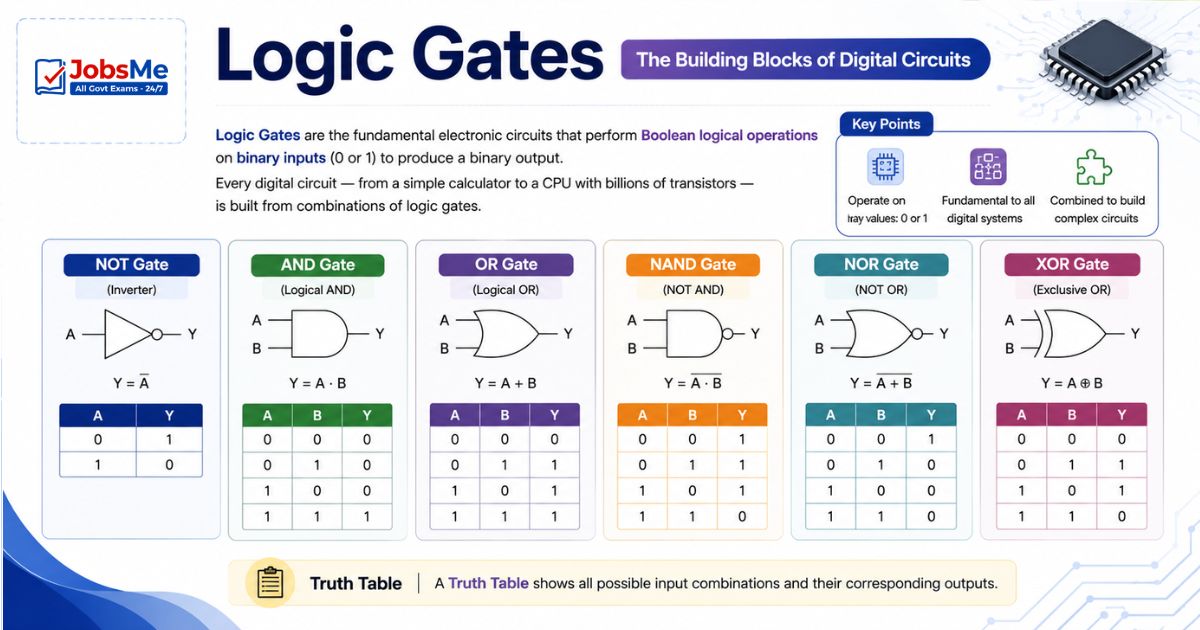
Basic Logic Gates
AND Gate:
- Symbol: A · B (multiplication)
- Rule: Output is 1 only when ALL inputs are 1
- Memory trick: "AND means BOTH must agree"
| A | B | Output (A AND B) |
|---|---|---|
| 0 | 0 | 0 |
| 0 | 1 | 0 |
| 1 | 0 | 0 |
| 1 | 1 | 1 |
OR Gate:
- Symbol: A + B (addition)
- Rule: Output is 1 when AT LEAST ONE input is 1
- Memory trick: "OR means ANY ONE is enough"
| A | B | Output (A OR B) |
|---|---|---|
| 0 | 0 | 0 |
| 0 | 1 | 1 |
| 1 | 0 | 1 |
| 1 | 1 | 1 |
NOT Gate (Inverter):
- Symbol: A' or Ā
- Rule: Output is the opposite (complement) of input — flips 0 to 1 and 1 to 0
- Inputs: Only one input (NOT gate is a single-input gate)
| A | Output (NOT A) |
|---|---|
| 0 | 1 |
| 1 | 0 |
NAND Gate (NOT + AND):
- Symbol: (A · B)'
- Rule: Output is 0 only when ALL inputs are 1 (opposite of AND)
- Universal Gate — can be used to build any other gate
| A | B | Output (NAND) |
|---|---|---|
| 0 | 0 | 1 |
| 0 | 1 | 1 |
| 1 | 0 | 1 |
| 1 | 1 | 0 |
NOR Gate (NOT + OR):
- Symbol: (A + B)'
- Rule: Output is 1 only when ALL inputs are 0 (opposite of OR)
- Universal Gate — can be used to build any other gate
| A | B | Output (NOR) |
|---|---|---|
| 0 | 0 | 1 |
| 0 | 1 | 0 |
| 1 | 0 | 0 |
| 1 | 1 | 0 |
XOR Gate (Exclusive OR):
- Symbol: A ⊕ B
- Rule: Output is 1 only when inputs are DIFFERENT (exactly one input is 1)
- Memory trick: "eXclusive — only when they disagree"
| A | B | Output (XOR) |
|---|---|---|
| 0 | 0 | 0 |
| 0 | 1 | 1 |
| 1 | 0 | 1 |
| 1 | 1 | 0 |
XNOR Gate (Exclusive NOR):
- Symbol: (A ⊕ B)'
- Rule: Output is 1 only when inputs are SAME
| A | B | Output (XNOR) |
|---|---|---|
| 0 | 0 | 1 |
| 0 | 1 | 0 |
| 1 | 0 | 0 |
| 1 | 1 | 1 |
Universal Gates
Universal Gates are gates that can be used to construct any other logic gate and therefore any digital circuit. There are two universal gates:
| Gate | Why Universal |
|---|---|
| NAND | AND = NAND + NOT; OR = NAND(NAND(A,A), NAND(B,B)); NOT = NAND(A,A) |
| NOR | OR = NOR + NOT; AND = NOR(NOR(A,A), NOR(B,B)); NOT = NOR(A,A) |
Exam Tip: "Which gates are called Universal Gates?" → NAND and NOR. This is asked in almost every exam.
Sign Bit, One's Complement and Two's Complement
Sign Bit:
- In binary representation of signed numbers, the Most Significant Bit (MSB) is the sign bit
- 0 = Positive (+)
- 1 = Negative (−)
One's Complement:
- Obtained by inverting all bits (flip every 0 to 1, and every 1 to 0)
- Example: One's complement of (1011)₂ = (0100)₂
Two's Complement:
- Obtained by adding 1 to the One's Complement
- Most widely used method for representing negative numbers in computers
- Example: Two's complement of (1011)₂:
- One's complement = (0100)₂
- Add 1: (0100)₂ + 1 = (0101)₂
Memory Tricks
🔑 Number System Bases — "Do Binary Octal Hex":
Decimal=10 | Binary=2 | Octal=8 | Hex=16 Silly: "Dogs Bite On Heat"
🔑 Hexadecimal Letter Values:
A=10, B=11, C=12, D=13, E=14, F=15 Trick: "After 9, count A B C D E F = 10 11 12 13 14 15"
🔑 Conversion Grouping Rule:
Binary → Octal: group in 3s (because 2³=8) Binary → Hex: group in 4s (because 2⁴=16) Mnemonic: "Octal = 3 bits, Hex = 4 bits, Oh-Ha!"
🔑 Coding Systems — Bits and Characters:
BCD=4bits/digit | ASCII-7=7bits=128 chars | ASCII-8=8bits=256 chars | EBCDIC=8bits=256 chars | Unicode=16bits=65536 chars "Big Animals Always Eat Unicorns" = BCD, ASCII-7, ASCII-8, EBCDIC, Unicode
🔑 Logic Gates Output Summary:
AND = Both must be 1 → "All Agree" OR = At least one is 1 → "One is enough" NOT = Flip it → "No, the opposite!" NAND = Opposite of AND → "Not AND" NOR = Opposite of OR → "Not OR" XOR = Different inputs → "eXclusive different"
🔑 Universal Gates = NAND + NOR:
"Neither Nor Nand needs nothing else!" = NAND and NOR are UNIVERSAL
🔑 Powers of 2 (Memorise up to 2¹⁰):
1, 2, 4, 8, 16, 32, 64, 128, 256, 512, 1024 Trick: each doubles — "1, 2, 4, 8... just keep doubling!"
One-Liner Recap (Quick Revision)
- Computers use the Binary Number System (base 2, digits 0 and 1) because transistors have only two states — ON (1) and OFF (0) — making binary the natural language of electronic circuits.
- The Decimal system has base 10 (digits 0-9), Binary has base 2 (0-1), Octal has base 8 (0-7), and Hexadecimal has base 16 (0-9, A-F where A=10 and F=15).
- To convert Decimal to Binary, repeatedly divide by 2 and read remainders from bottom to top — the last remainder is the Most Significant Bit (MSB).
- To convert Binary to Decimal, multiply each bit by its positional power of 2 (starting from 2⁰ at the rightmost bit) and add all the results together.
- To convert Binary to Octal, group bits in sets of 3 from the right and convert each group — because 2³ = 8, three binary digits map exactly to one octal digit.
- To convert Binary to Hexadecimal, group bits in sets of 4 from the right and convert each group — because 2⁴ = 16, four binary digits map exactly to one hex digit.
- To convert between Octal and Hexadecimal, always use Binary as an intermediate step — Octal → Binary → Hexadecimal (or vice versa).
- BCD (Binary Coded Decimal), developed by IBM, uses 4 bits to represent each decimal digit (0-9) individually, with no limit on the total number size.
- ASCII-7 uses 7 bits to represent 128 unique characters (2⁷), while Extended ASCII-8 uses 8 bits to represent 256 characters (2⁸), covering English text and symbols.
- EBCDIC (Extended Binary Coded Decimal Interchange Code), developed by IBM, uses 8 bits and is used exclusively in IBM mainframe computers.
- Unicode uses 16 or more bits and can represent over 65,536 characters (2¹⁶), covering every character of every language in the world, including Chinese, Arabic, Hindi, and emojis.
- An AND gate gives output 1 only when ALL inputs are 1; an OR gate gives output 1 when AT LEAST ONE input is 1; a NOT gate inverts the input.
- NAND and NOR are called Universal Gates because any logic circuit — including AND, OR, and NOT gates — can be built using only NAND gates or only NOR gates.
- XOR (Exclusive OR) gate gives output 1 only when inputs are different (one is 0 and the other is 1), making it the "disagreement" gate.
- In signed binary representation, the MSB (Most Significant Bit) is the Sign Bit — 0 means positive and 1 means negative; Two's Complement is the standard method for representing negative numbers.
Preparing for competitive exams requires consistent revision. Platforms like JobsMe simplify preparation through:
- Daily Current Affairs
- Weekly Current Affairs
- Monthly Current Affairs
- Static GK for Competitive Exams
- Latest Government Jobs Notifications
- Banking Awareness
Stay updated, revise regularly, and attempt quizzes for better accuracy in UPSC, SSC CGL, IBPS PO/Clerk, SBI, RBI Grade B, RRB NTPC, Defence, and State PSC exams.
Free quiz • No signup required
Put this topic into practice with Daily Current Affairs MCQ Quiz – 27 May 2026 | SSC, Banking, UPSC, Railways & Defence Exams. It is the quickest way to reinforce what you just learned.
Frequently Asked Questions
Why do computers use binary instead of decimal?
What is the difference between the four number systems?
How do you convert decimal 100 to binary?
What is ASCII and how many characters can it represent?
What is the difference between ASCII and Unicode?
What is EBCDIC and where is it used?

About the author