
Memory Management in Computers – Complete Notes for IBPS, SSC, RRB & Govt Exams
Memory Management is one of the highest-scoring topics in Computer Awareness for IBPS, SSC, and RRB exams. This post covers the complete memory hierarchy — Registers, Cache, Primary Memory (RAM & ROM types), Secondary Memory (HDD, SSD, optical storage), Virtual Memory, Flash Memory — along with all memory units from Bit to GeopByte. Includes detailed tables, memory tricks, one-liners, and 10 exam-focused FAQs.

Jump to section
- Introduction: Why Memory Management is Critical for Govt Exams
- Memory Hierarchy - The Speed-Cost-Capacity Triangle
- Primary Memory (Main Memory / Internal Memory)
- Cache Memory - The Speed Bridge
- Secondary Memory (Auxiliary / External Memory)
- Other Memory Types
- Memory Units - From Bit to GeopByte
- Primary vs. Secondary Memory - Key Comparison
- Memory Tricks
- One-Liner Recap (Quick Revision)
Introduction: Why Memory Management is Critical for Govt Exams
Memory is the component that makes a computer truly intelligent — without memory, a computer cannot store programs, retain data, or maintain state. Every action a computer performs involves memory in some form: receiving input (stored in RAM), executing a program (fetched from storage into RAM), displaying output (video memory), and saving results (secondary storage).
In government job exams, Memory Management is tested extensively because it covers a wide range of specific, factual questions:
- "Which memory is volatile?" → RAM
- "Which is the fastest memory?" → Registers (inside CPU)
- "Which type of ROM is erased by UV light?" → EPROM
- "1 KB = ___ bytes?" → 1024
- "CD capacity is ___ MB?" → 640-680 MB
- "Which storage has no moving parts?" → SSD
These questions are direct, objective, and easy to score if you have the facts memorised. The Memory topic also forms the backbone for understanding Operating Systems (virtual memory, page swapping), Computer Architecture (registers, cache), and Secondary Storage (HDD vs SSD comparisons).
This post covers every type of memory — from the fastest register inside the CPU to the slowest magnetic tape — with complete tables, clear comparisons, and memory units from Bit to GeopByte.
Memory Hierarchy - The Speed-Cost-Capacity Triangle
Memory in a computer exists on a hierarchy — as you go up the hierarchy, memory gets faster but smaller and more expensive. As you go down, it gets slower but larger and cheaper.
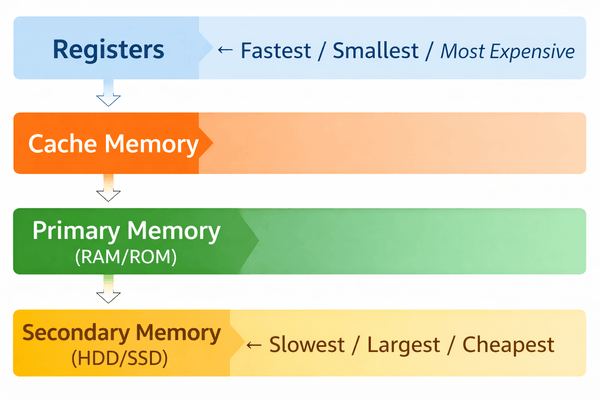
| Level | Type | Speed | Capacity | Cost | Volatility |
|---|---|---|---|---|---|
| Level 0 | Registers (in CPU) | Fastest | Bytes | Very High | Volatile |
| Level 1 | Cache Memory (L1/L2/L3) | Very Fast | KB-MB | High | Volatile |
| Level 2 | Primary Memory (RAM) | Fast | GB | Moderate | Volatile |
| Level 3 | Secondary Memory (HDD/SSD) | Slow-Moderate | TB | Low | Non-Volatile |
The Golden Rule: As memory moves closer to the CPU (up the hierarchy), it becomes faster but smaller and more expensive.
Primary Memory (Main Memory / Internal Memory)
Primary Memory (also called Main Memory or Internal Memory) is the memory that the CPU can directly access and communicate with — without any intermediate step. It holds the data and programs currently being used by the processor.
Key Characteristics of Primary Memory:
- Directly accessible by the CPU
- Volatile — contents are lost when power is switched off (for RAM)
- Limited in storage capacity compared to secondary memory
- Faster than all secondary storage
- Two main types: RAM and ROM
RAM (Random Access Memory)
RAM is the primary working memory of a computer — it temporarily stores:
- The operating system currently running
- All open applications and programs
- Data currently being worked on
- Output waiting to be displayed
Why "Random Access"? Because any memory location in RAM can be accessed directly (randomly) in the same amount of time — unlike tape memory which requires sequential access.
Key Properties of RAM:
- Read/Write memory — data can be both read from and written to it
- Volatile — all data is erased when the computer is switched off
- Also called Primary Storage, Temporary Memory, or Working Memory
- The more RAM a computer has, the more programs it can run simultaneously without slowing down
Types of RAM: DRAM vs. SRAM
| Feature | DRAM (Dynamic RAM) | SRAM (Static RAM) |
|---|---|---|
| Full Form | Dynamic Random Access Memory | Static Random Access Memory |
| Construction | Made of capacitors + transistors | Made of multiple transistors (flip-flops) |
| Refresh needed? | Yes — must be refreshed thousands of times per second | No — retains data as long as power is supplied |
| Speed | Slower | Faster |
| Cost | Cheaper | More expensive |
| Density | Higher (more storage in less space) | Lower |
| Power consumption | Higher (due to refresh cycles) | Lower |
| Primary use | Main system RAM (the sticks you install in a PC) | Cache memory inside CPU |
Exam Tip: DRAM → Main RAM → Cheaper, needs refresh. SRAM → Cache → Faster, no refresh needed. These are frequently compared in MCQs.
ROM (Read Only Memory)
ROM is the non-volatile counterpart of RAM — it retains its contents even when the computer is switched off. ROM is written during the manufacturing process and contains firmware — permanent instructions that the computer needs to start up.
Key Properties of ROM:
- Non-volatile — data is retained without power
- Read-only (in its basic form) — cannot be rewritten by normal means
- Contains BIOS (Basic Input/Output System) — the firmware that runs first when a computer starts
- Also called Permanent Memory
Types of ROM: PROM, EPROM, EEPROM
| Type | Full Form | Can be Erased? | How? | Key Use |
|---|---|---|---|---|
| ROM | Read Only Memory | No | Cannot be erased | Factory firmware |
| PROM | Programmable ROM | No | One-time programmable by user; after that, permanent | Custom firmware |
| EPROM | Erasable Programmable ROM | Yes | Erased by exposure to ultraviolet (UV) light for 15-20 minutes | Microcontrollers, older BIOS chips |
| EEPROM | Electrically Erasable Programmable ROM | Yes | Erased by applying an electrical charge (selectively, byte by byte) | Modern BIOS/UEFI chips, flash memory |
Key Exam Fact:
- EPROM = UV light erasing → also called UVEPROM
- EEPROM = Electrical erasing → most flexible; forms the basis of Flash Memory
- BIOS chips in modern computers use EEPROM technology
Cache Memory - The Speed Bridge
Cache Memory is a small, extremely fast memory that acts as a high-speed buffer between the CPU and RAM. Its purpose is to reduce the time the CPU spends waiting for data from the slower main memory.
How Cache Works:
- When the CPU needs data, it first checks Cache memory
- If the data is found (Cache Hit) — data is served immediately at full CPU speed
- If not found (Cache Miss) — data is fetched from RAM and a copy is stored in Cache for future use
- Frequently used data stays in Cache, dramatically reducing wait times
| Feature | Details |
|---|---|
| Technology | SRAM (Static RAM) — no refresh needed |
| Size | Typically 256 KB to 32 MB depending on level |
| Speed | Faster than RAM; slower than Registers |
| Cost | Very expensive per byte |
| Levels | L1 Cache (inside CPU core — fastest), L2 Cache (per core or shared), L3 Cache (shared across all cores — largest) |
| Cache Level | Location | Speed | Size |
|---|---|---|---|
| L1 Cache | Inside each CPU core | Fastest (1-4 clock cycles) | 32 KB - 512 KB per core |
| L2 Cache | Per core or between core and L3 | Fast (4-12 clock cycles) | 256 KB - 4 MB per core |
| L3 Cache | Shared across all CPU cores | Moderate (25-40 cycles) | 8 MB - 64 MB |
Exam Tip: "Cache memory sits between ___ and ___" → Answer: CPU and RAM (or CPU and Main Memory)
Secondary Memory (Auxiliary / External Memory)
Secondary Memory is the long-term, permanent storage of a computer. Unlike primary memory, it:
- Is non-volatile — data is retained indefinitely even without power
- Cannot be accessed directly by the CPU — data must first be copied into RAM
- Has much larger storage capacity (TB vs. GB for RAM)
- Is much slower than primary memory
- Is much cheaper per unit of storage
Secondary memory is where all your files, operating system, applications, photos, videos, and documents are permanently stored.
Magnetic Storage Devices
| Device | Capacity | Access Type | Key Details |
|---|---|---|---|
| HDD (Hard Disk Drive) | Up to several TB | Random access | Fixed disk inside the computer; has platters (magnetic disks), read/write heads, tracks, sectors, and cylinders; data is stored magnetically |
| Floppy Disk | 80 KB - 1.44 MB | Random access | Removable; three historical sizes: 8 inch, 5¼ inch, 3½ inch; now mostly obsolete |
| Magnetic Tape | Up to 1 TB | Sequential access (slow) | Long strips of magnetic tape; 12.5-25 mm wide; primarily used for backup and archiving; must be read from beginning to end sequentially |
HDD Components:
- Platter — rotating magnetic disk where data is stored
- Read/Write Head — electromagnetic arm that reads/writes data on the platter
- Track — concentric circle on the platter surface
- Sector — smallest addressable unit on a track
- Cylinder — all tracks at the same position across all platters
Optical Storage Devices
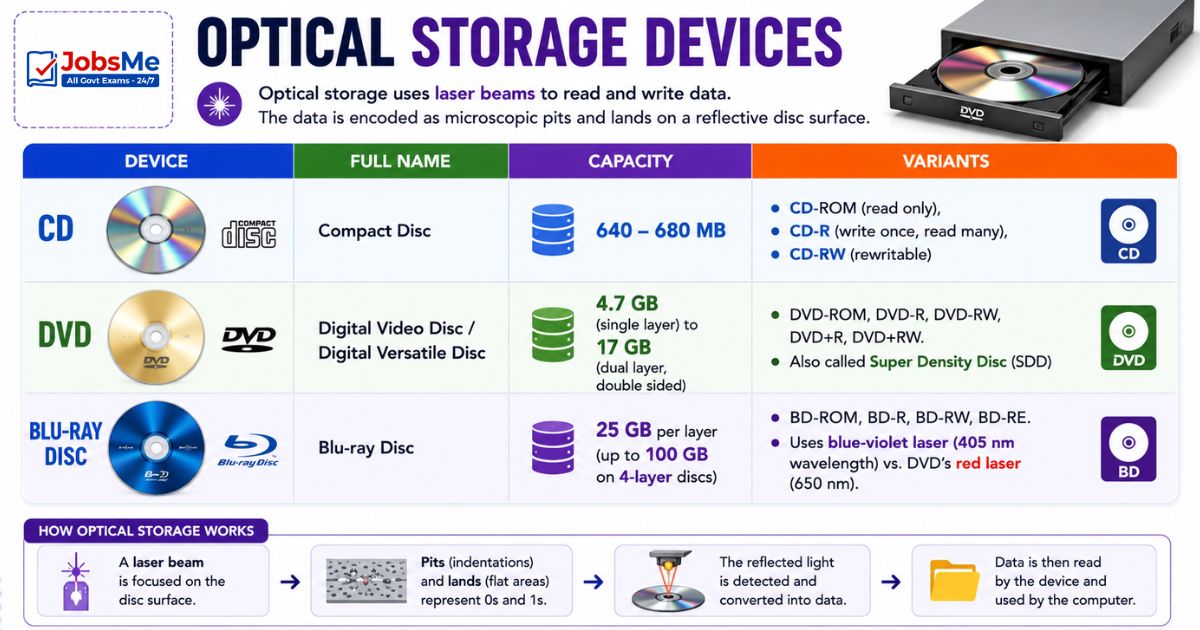
Optical storage uses laser beams to read and write data. The data is encoded as microscopic pits and lands on a reflective disc surface.
| Device | Full Name | Capacity | Variants |
|---|---|---|---|
| CD | Compact Disc | 640-680 MB | CD-ROM (read only), CD-R (write once, read many), CD-RW (rewritable) |
| DVD | Digital Video Disc / Digital Versatile Disc | 4.7 GB (single layer) to 17 GB (dual layer, double sided) | DVD-ROM, DVD-R, DVD-RW, DVD+R, DVD+RW. Also called Super Density Disc (SDD) |
| Blu-ray Disc (BD) | Blu-ray Disc | 25 GB per layer (up to 100 GB on 4-layer discs) | BD-ROM, BD-R, BD-RW, BD-RE. Uses blue-violet laser (405 nm wavelength) vs. DVD's red laser (650 nm) |
Why is it called Blu-ray? Because it uses a blue-violet laser with a shorter wavelength than the red laser used in DVDs. Shorter wavelength = can read/write smaller pits = more data per disc.
| Feature | CD | DVD | Blu-ray |
|---|---|---|---|
| Capacity | 680 MB | 4.7-17 GB | 25-100 GB |
| Laser Type | Infrared (780 nm) | Red (650 nm) | Blue-violet (405 nm) |
| Layers | Single | Single or Dual | Single, Dual, or Quad |
Solid State Storage Devices
Solid State storage uses semiconductor flash memory chips — no moving parts, no mechanical components. This makes them faster, more durable, and more energy-efficient than magnetic or optical storage.
| Device | Capacity | Interface | Key Notes |
|---|---|---|---|
| Pen Drive / USB Flash Drive / Thumb Drive | 256 MB - 512 GB+ | USB | Removable; plug-and-play; most portable storage device |
| Memory Card | Varies | SD, MicroSD | Used in cameras, phones, drones, dashcams |
| SSD (Solid State Drive) | 128 GB - 4 TB+ | SATA | No moving parts; 5-10× faster than HDD; used in modern laptops and desktops |
| NVMe SSD | 128 GB - 4 TB+ | PCIe (M.2 slot) | Fastest consumer storage available; 5-7× faster than SATA SSD; directly on the PCIe lane |
| M.2 Drive | Varies | PCIe or SATA | Small form-factor drive that plugs directly into the motherboard |
HDD vs SSD - Key Comparison:
| Feature | HDD | SSD |
|---|---|---|
| Technology | Magnetic spinning platters | Flash memory chips |
| Speed | Slower (80-160 MB/s) | Much faster (500 MB/s - 7000 MB/s) |
| Moving parts | Yes | No |
| Durability | Less (sensitive to shock) | More (no moving parts) |
| Cost per GB | Lower | Higher |
| Noise | Audible | Silent |
| Weight | Heavier | Lighter |
| Boot time | Slower | Much faster |
Other Memory Types
Flash Memory
Flash Memory is a type of EEPROM-based non-volatile memory that can be electrically erased and reprogrammed. It combines the best of both worlds — it retains data without power (like ROM) but can be rewritten (like RAM).
Key Properties:
- Semiconductor-based (no moving parts)
- Non-volatile — data retained without power
- Rewritable — can be erased and reprogrammed many times
- Used in: USB drives, memory cards, SSDs, cameras, printers, smartphones
Virtual Memory
Virtual Memory is a memory management technique that uses part of the hard disk (or SSD) space as an extension of RAM. When RAM is full, the OS moves some data from RAM to a designated area on the hard disk called the Page File (Windows) or Swap Space (Linux).
Why is Virtual Memory used?
- Allows programs that are larger than physical RAM to run
- Enables multitasking beyond the physical memory limit
- Makes the system appear to have more RAM than physically installed
Limitation: Virtual memory is much slower than physical RAM because hard disk access speeds are significantly lower than RAM speeds. Excessive use of virtual memory causes a system to slow down dramatically — called thrashing.
eMMC and UFS
| Type | Full Form | Description | Used In |
|---|---|---|---|
| eMMC | Embedded MultiMediaCard | Slower flash storage; soldered onto the motherboard; not removable | Budget smartphones, tablets |
| UFS | Universal Flash Storage | Faster flash storage; supports simultaneous read and write; significantly faster than eMMC | Premium smartphones (Samsung, OnePlus) |
Memory Units - From Bit to GeopByte
Understanding memory units is essential — direct conversion questions appear in almost every exam:
| Unit | Equivalent | Notes |
|---|---|---|
| 1 Bit | Binary digit (0 or 1) | Smallest unit of digital information |
| 4 Bits | 1 Nibble | Half a byte; represents one hexadecimal digit |
| 8 Bits | 1 Byte | Basic unit; can represent 256 (2⁸) different values |
| 1024 Bytes | 1 KB (KiloByte) | Approximately 1 thousand bytes |
| 1024 KB | 1 MB (MegaByte) | ~1 million bytes |
| 1024 MB | 1 GB (GigaByte) | ~1 billion bytes |
| 1024 GB | 1 TB (TeraByte) | ~1 trillion bytes |
| 1024 TB | 1 PB (PetaByte) | Used for large data centres |
| 1024 PB | 1 EB (ExaByte) | Internet traffic scale |
| 1024 EB | 1 ZB (ZettaByte) | Global data scale |
| 1024 ZB | 1 YB (YottaByte) | — |
| 1024 YB | 1 BB (BrontoByte) | — |
| 1024 BB | 1 GeopByte | Largest named unit |
Complete Order (Smallest to Largest):
bit → Nibble → Byte → KB → MB → GB → TB → PB → EB → ZB → YB → BB → GeopByte
Important Capacity Facts for Exams:
- CD = 640-680 MB
- DVD = 4.7 GB (single layer) to 17 GB (double sided, dual layer)
- Blu-ray = 25 GB per layer
- Floppy (3½ inch) = 1.44 MB
Primary vs. Secondary Memory - Key Comparison
| Feature | Primary Memory (RAM) | Secondary Memory (HDD/SSD) |
|---|---|---|
| Also called | Main memory, Internal memory | Auxiliary memory, External memory |
| CPU access | Directly accessible | Not directly accessible; data must go to RAM first |
| Volatility | Volatile (lost on power off) | Non-volatile (data retained permanently) |
| Speed | Fast | Slow (HDD) to Fast (SSD) |
| Capacity | Limited (4-64 GB typical) | Large (256 GB - several TB) |
| Cost per GB | Higher | Lower |
| Purpose | Temporary working space | Permanent data storage |
| Examples | RAM, ROM, Cache | HDD, SSD, CD, DVD, Blu-ray |
Memory Tricks
🔑 Memory Hierarchy — Fastest to Slowest:
"Reg-Cache-RAM-Hard" = Registers → Cache → RAM → Hard Disk Trick: "Rich Children Rarely Help"
🔑 ROM Types — How Each is Erased:
PROM = Permanent (no erase) EPROM = Erased by UV light ("Eyes hurt in UV") EEPROM = EE = Electrically Erased (two E's = double electric!)
🔑 DRAM vs SRAM:
DRAM = Dyn amic = needs Daily refresh = Main Desktop RAM SRAM = Static = Stable = Speed = used for Superfast Cache
🔑 Memory Units Order:
"Biting KittMeGaTeraPetaExaZettaYotta" Bit → KB → MB → GB → TB → PB → EB → ZB → YB
🔑 Storage Capacities:
CD = "640 to 680" → think "6-4-0 to 6-8-0" DVD = "4.7 GB" → "4.7 = Four-point-Seven" Blu-ray = "25 per layer" → "Blue is BIGGER"
🔑 Virtual Memory:
"When RAM is FULL → Hard disk acts as RAM → This is Virtual Memory"
One-Liner Recap (Quick Revision)
- Memory in a computer exists on a hierarchy — Registers (fastest) → Cache → RAM → Secondary Storage (slowest) — with speed decreasing and capacity increasing down the hierarchy.
- Primary memory (RAM and ROM) is directly accessible by the CPU, while secondary memory (HDD, SSD) cannot be directly accessed and must first be loaded into RAM.
- RAM (Random Access Memory) is volatile, read/write memory that temporarily holds all currently running programs and data, and is erased when the computer powers off.
- DRAM (Dynamic RAM) requires constant electrical refreshing, is used as main system RAM, and is cheaper; SRAM (Static RAM) needs no refresh, is faster, and is used as cache memory.
- ROM (Read Only Memory) is non-volatile memory that retains its contents without power and stores the BIOS firmware that initialises the computer at startup.
- EPROM is erased by exposure to ultraviolet (UV) light, while EEPROM is erased by an electrical charge — EEPROM is used in modern BIOS/UEFI chips.
- Cache memory is a high-speed SRAM buffer between the CPU and RAM that stores frequently accessed data to reduce the time the CPU waits for information.
- Cache memory has three levels — L1 (fastest, inside each CPU core), L2 (per core), and L3 (shared across all cores, largest) — with speed decreasing and size increasing.
- Flash Memory is non-volatile, electrically rewritable semiconductor memory used in USB drives, SSDs, memory cards, and smartphones.
- Virtual Memory uses hard disk space as an extension of RAM, allowing programs larger than physical RAM to run but at significantly reduced speed.
- HDD stores data on rotating magnetic platters using read/write heads, while SSD uses flash memory chips with no moving parts — SSDs are faster, quieter, and more durable.
- NVMe SSD uses the PCIe lane and M.2 slot on the motherboard, achieving speeds of up to 7,000 MB/s — far faster than SATA SSDs (500 MB/s) or HDDs (150 MB/s).
- CD holds 640-680 MB, DVD holds 4.7 GB (single layer) to 17 GB (dual layer/double-sided), and Blu-ray holds 25 GB per layer.
- The smallest unit of digital information is a bit (0 or 1); 8 bits = 1 Byte; 1024 Bytes = 1 KB; 1024 KB = 1 MB; and this pattern continues up to GeopByte (the largest named unit).
1 Nibble = 4 bits, and one nibble can represent one hexadecimal digit — making it important for number system conversions tested in SSC and banking exams.
Preparing for competitive exams requires consistent revision. Platforms like JobsMe simplify preparation through:
- Daily Current Affairs
- Weekly Current Affairs
- Monthly Current Affairs
- Static GK for Competitive Exams
- Latest Government Jobs Notifications
- Banking Awareness
Stay updated, revise regularly, and attempt quizzes for better accuracy in UPSC, SSC CGL, IBPS PO/Clerk, SBI, RBI Grade B, RRB NTPC, Defence, and State PSC exams.
Free quiz • No signup required
Put this topic into practice with Current Affairs Quiz 12 June 2026 MCQs for UPSC, SSC, Banking, Railways & State PSC Exams. It is the quickest way to reinforce what you just learned.
Frequently Asked Questions
What is the difference between primary memory and secondary memory?
What does volatile memory mean? Which memories are volatile?
What is the difference between DRAM and SRAM?
What is BIOS and what type of memory stores it?
What is cache memory and what are its three levels?
What is virtual memory and how does it work?

About the author