Basics of Computer Organisation – Complete Notes for IBPS, SSC, RRB & Govt Exams
Learn Basics of Computer Organisation for IBPS, SSC, RRB & all Govt Exams. Covers definition, functions, features, types & memory tricks. Free study notes at jobsme.in.
Jump to section
- Introduction: Why Computer Organisation Matters in Govt Exams
- What is a Computer? Definition & Origin
- The Four Basic Functions of a Computer (IPOS Cycle)
- Key Features (Characteristics) of a Computer
- Basic Computer Terminology You Must Know
- Classification of Computers
- Types of Microcomputers
- Supercomputers - Key Facts for Every Exam
- Advantages and Disadvantages of Computers
- Memory Tricks
- One-Liner Recap (Quick Revision)
Introduction: Why Computer Organisation Matters in Govt Exams
Computer Awareness is a compulsory section in almost every major government job exam in India — including IBPS PO, IBPS Clerk, SBI PO, SBI Clerk, RRB NTPC, SSC CGL, SSC CHSL, RBI Assistant, LIC AAO, and various State PSC exams. Among all the topics in Computer Awareness, Basics of Computer Organisation is the single most foundational chapter. It is the starting point from which every other topic — hardware, software, networking, operating systems — branches out.
Questions from this chapter appear in almost every exam paper, typically in the form of:
- Definition-based MCQs ("A computer is best described as ___")
- Feature-based MCQs ("Which feature of a computer means it never gets tired?")
- Classification MCQs ("Which is the fastest type of computer?")
- Inventor/Milestone MCQs ("Who developed India's first supercomputer?")
If you master this chapter thoroughly, you build the mental framework needed to understand every other topic in Computer Awareness. This post gives you everything — detailed notes, tables, tricks, and FAQs — so you never lose a single mark from this topic.
What is a Computer? Definition & Origin
The word "computer" is derived from the Latin word "computare", which literally means "to calculate." In ancient times, the word was used to describe a person who performed mathematical calculations. Over time, as machines began doing the same work, the term shifted to describe the machine itself.
In modern terms, a computer is defined as:
"An electronic device that accepts data (input), processes it according to a set of stored instructions (program), produces a meaningful result (output), and stores the result for future use."
The key elements of this definition are:
- Electronic — it works on electrical signals
- Accepts data — it needs input to function
- Processes — the CPU executes instructions
- Produces output — the result is communicated to the user
- Stores results — data can be retained temporarily or permanently
A computer cannot think on its own — it only does what it is instructed to do. It has no emotions, no judgement, and no creativity of its own. Every action it performs is the direct result of a program written by a human.
The Four Basic Functions of a Computer (IPOS Cycle)
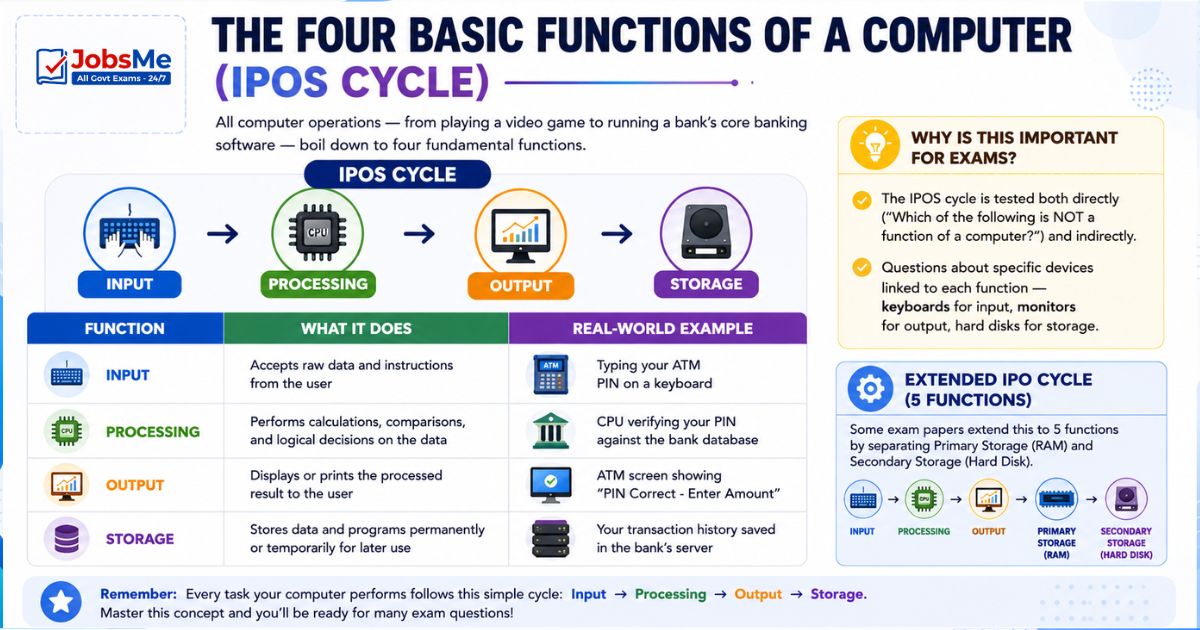
All computer operations — from playing a video game to running a bank's core banking software — boil down to four fundamental functions. These are collectively called the IPOS Cycle:
| Function | What It Does | Real-World Example |
|---|---|---|
| Input | Accepts raw data and instructions from the user | Typing your ATM PIN on a keyboard |
| Processing | Performs calculations, comparisons, and logical decisions on the data | CPU verifying your PIN against the bank database |
| Output | Displays or prints the processed result to the user | ATM screen showing "PIN Correct - Enter Amount" |
| Storage | Stores data and programs permanently or temporarily for later use | Your transaction history saved in the bank's server |
Why is this important for exams? The IPOS cycle is tested both directly ("Which of the following is NOT a function of a computer?") and indirectly (questions about specific devices linked to each function — keyboards for input, monitors for output, hard disks for storage).
Extended IPO Cycle: Some exam papers extend this to 5 functions by separating Primary Storage (RAM) and Secondary Storage (Hard Disk). In that case: Input → Processing → Output → Primary Storage → Secondary Storage.
Key Features (Characteristics) of a Computer
The features of a computer distinguish it from all other machines and tools. These are repeatedly tested in government exams — often asking which feature matches a given description.
| Feature | Description | Exam Keyword |
|---|---|---|
| Speed | Processes millions to billions of instructions per second; measured in MIPS, MHz, or GHz | "Millions of instructions" |
| Accuracy | Produces exact results every single time — errors occur only due to wrong input or programming | "Error-free", "GIGO" |
| Storage Capacity | Can store enormous amounts of data — from KBs to TBs — on internal and external storage | "Huge data", "Hard disk" |
| Versatility | Can perform multiple completely different tasks — accounting, designing, gaming, communication | "Multi-purpose", "Different tasks" |
| Automation | Executes tasks automatically and repeatedly once a program is running, without human intervention | "Automatically", "Without human help" |
| Diligence | Works for hours, days, or years without fatigue, loss of concentration, or decrease in accuracy | "Tireless", "No fatigue" |
| Secrecy | Password protection and encryption prevent unauthorised access to data | "Password", "Security" |
| Reliability | Produces consistent, dependable, repeatable output under all conditions | "Consistent", "Dependable" |
| Plug and Play | Automatically detects, installs, and configures new hardware or software devices | "Auto-configure", "USB devices" |
GIGO Principle - Accuracy in Detail
GIGO stands for "Garbage In, Garbage Out." This principle highlights the limitation of the computer's accuracy feature — while a computer processes data with 100% precision, it cannot correct fundamentally wrong input.
For example: If you ask a computer to calculate 10% interest on ₹50,000 but incorrectly enter ₹5,00,000 as the principal, the computer will give you a precise but completely wrong answer. The error is human, not mechanical.
Exam Tip: GIGO is one of the most frequently tested concepts. Questions appear as: "GIGO stands for ___" or "Which principle explains that a computer's output quality depends on its input quality?"
Basic Computer Terminology You Must Know
Before diving deeper into computer studies, you must be rock-solid on these fundamental terms. These are tested in fill-in-the-blank and match-the-column type questions.
| Term | Meaning |
|---|---|
| Hardware | All physical, tangible parts of a computer that you can touch — keyboard, monitor, CPU chip, RAM sticks, hard disk |
| Software | All programs and instructions that run on hardware — they are intangible; you cannot physically touch them |
| Data | Raw, unprocessed facts and figures that have no meaning by themselves — numbers, text, images in raw form |
| Information | Data that has been processed, organised, and made meaningful and useful for the user |
| Instruction | A single command given to a computer that tells it to perform one specific operation |
| Program | A complete, ordered set of instructions designed to make the computer perform a specific task |
| User | Any person who interacts with and operates the computer system |
Data vs. Information - Key Difference
This distinction is tested in almost every exam:
| Aspect | Data | Information |
|---|---|---|
| Definition | Raw, unprocessed facts | Processed, meaningful result |
| Form | Unorganised, random | Organised, structured |
| Example | 85, 72, 90, 66 (marks) | Average score = 78.25 |
| Usefulness | Not directly useful | Directly useful for decisions |
| Nature | Input to computer | Output from computer |
Simple Rule: Data goes in → Processing happens → Information comes out.
Classification of Computers
Computers are classified on three main bases. Each classification is regularly tested in government exams.
A) Based on Size
This is the most important classification for exams. The four types from smallest to largest:
| Type | Description | Key Characteristics | Examples |
|---|---|---|---|
| Microcomputer | Smallest category; built around a single microprocessor chip; designed for individual use | Single user, affordable, portable | Desktop PC, Laptop, Tablet, Smartphone, PDA |
| Minicomputer | Mid-range; larger than microcomputer; can support multiple simultaneous users | Multi-user, used as servers in departments | IBM-17, DEC PDP-11, HP-9000 |
| Mainframe Computer | Large, powerful systems; designed to support hundreds or thousands of users simultaneously | High processing power, used by banks, airlines, government | IBM-370, IBM-S/390, UNIVAC 1110 |
| Supercomputer | The fastest, most powerful computers ever built; used for highly complex scientific calculations | Speed in FLOPS, extremely expensive, used by research labs | CRAY-1, PARAM, Frontier |
Size Hierarchy (Easy Memory Aid): Micro < Mini < Mainframe < Super
B) Based on Work (Type of Data Processed)
| Type | How It Works | Real-World Examples |
|---|---|---|
| Analog Computer | Processes continuously varying physical signals (voltage, temperature, pressure, speed) — the data has no fixed discrete values | Speedometer, thermometer, seismograph, ECG machine, fuel gauge |
| Digital Computer | Processes only discrete binary data — everything is represented as 0s and 1s | Desktop PC, laptop, smartphone, ATM machine |
| Hybrid Computer | Combines the processing power of analog and the precision of digital — accepts analog input, converts to digital for processing | Hospital ICU monitors, dialysis machines, aircraft flight simulators |
Key Differentiator for Exams:
- Analog → "Continuous" data → Physical world
- Digital → "Discrete" data → Binary (0 and 1)
- Hybrid → "Best of both" → Medical/Scientific use
C) Based on Purpose
| Type | Description | Examples |
|---|---|---|
| General Purpose Computer | Designed to solve a wide variety of different problems by running different programs | Accounting, database management, gaming, word processing, web browsing |
| Special Purpose Computer | Designed and optimised to solve one specific, dedicated problem only | ATM machine, aircraft landing system, traffic signal controller, weather station |
Types of Microcomputers
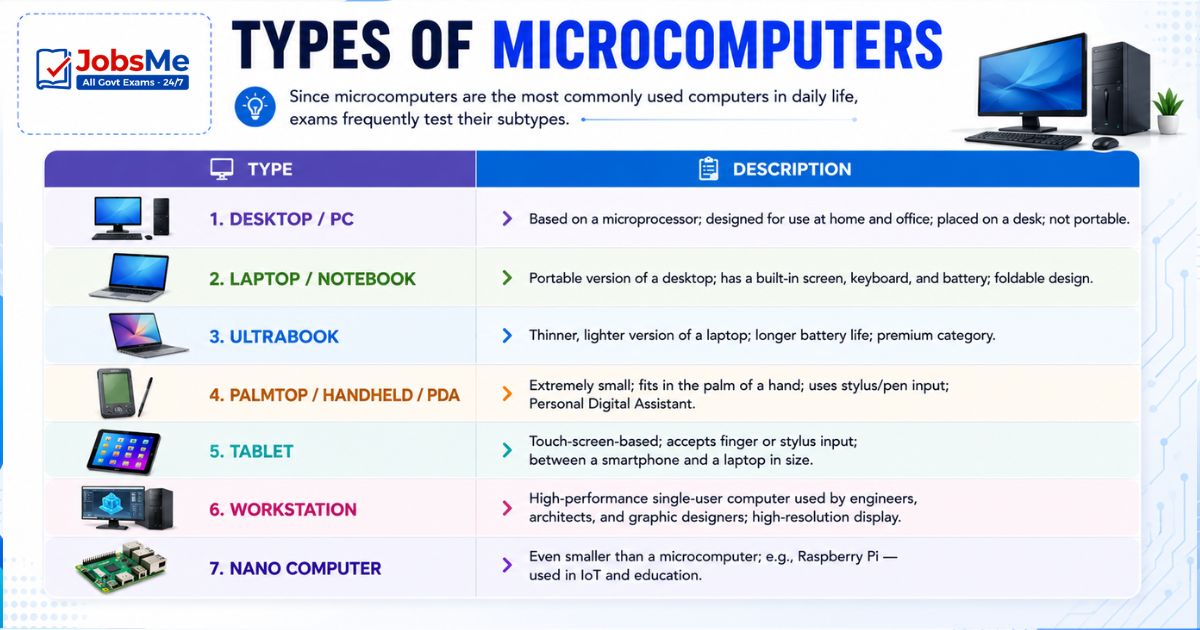
Since microcomputers are the most commonly used computers in daily life, exams frequently test their subtypes:
| Type | Description |
|---|---|
| Desktop / PC | Based on a microprocessor; designed for use at home and office; placed on a desk; not portable |
| Laptop / Notebook | Portable version of a desktop; has a built-in screen, keyboard, and battery; foldable design |
| Ultrabook | Thinner, lighter version of a laptop; longer battery life; premium category |
| Palmtop / Handheld / PDA | Extremely small; fits in the palm of a hand; uses stylus/pen input; Personal Digital Assistant |
| Tablet | Touch-screen-based; accepts finger or stylus input; between a smartphone and a laptop in size |
| Workstation | High-performance single-user computer used by engineers, architects, and graphic designers; high-resolution display |
| Nano Computer | Even smaller than a microcomputer; e.g., Raspberry Pi — used in IoT and education |
Supercomputers - Key Facts for Every Exam
Supercomputers are the ultimate machines — used for tasks like weather forecasting, nuclear simulations, genome sequencing, space research, and climate modelling. Their speed is measured in FLOPS (Floating Point Operations Per Second).
| Speed Unit | Value |
|---|---|
| KiloFLOPS | 10³ FLOPS |
| MegaFLOPS | 10⁶ FLOPS |
| GigaFLOPS | 10⁹ FLOPS |
| TeraFLOPS | 10¹² FLOPS |
| PetaFLOPS | 10¹⁵ FLOPS |
| ExaFLOPS | 10¹⁸ FLOPS |
Indian and World Supercomputers at a Glance
| Supercomputer | Country | Year | Speed | Significance |
|---|---|---|---|---|
| CRAY-1 | USA | 1976 | — | World's FIRST supercomputer; designed by Seymour R. Cray |
| PARAM | India | 1990 | — | India's FIRST supercomputer; developed by C-DAC |
| Pratyush | India | 2018 | 6.8 PetaFLOPS | India's first multi-petaflops supercomputer; IITM, Pune; 4th fastest for weather research globally |
| PARAM Siddhi-AI | India | 2020 | 5.27 PetaFLOPS | India's first AI supercomputer |
| Frontier | USA | 2022 | 1.2 ExaFLOPS | World's CURRENT FASTEST supercomputer (as of 2024) |
Special Mention:
- Quantum Computer — Theoretical fastest computer; uses quantum bits (qubits); concept introduced by Richard Feynman; Google's Sycamore processor achieved Quantum Supremacy in 2019
- Nano Computer — Smaller than microcomputer; example: Raspberry Pi
Advantages and Disadvantages of Computers
| Advantages | Disadvantages |
|---|---|
| Extremely high processing speed | Cannot think, reason, or make judgements independently |
| 100% accuracy (with correct input) | Completely dependent on electricity |
| Massive data storage capacity | Vulnerable to viruses, malware, and cyber attacks |
| Can perform multitasking simultaneously | High initial cost of setup and maintenance |
| Works 24×7 without any fatigue | Environmental impact — e-waste, energy consumption |
| Automates repetitive, boring tasks | No emotional intelligence or creativity |
Memory Tricks
🔑 Remember the 4 Functions — "IPOS"
Input → Process → Output → Storage Silly sentence: "I Prefer Orange Samosas"
🔑 Remember Computer Features — First Letters: "SAVED R PP"
Speed | Accuracy | Versatility | Efficiency (Diligence) | Dependability (Reliability) | Secrecy | Reliability | Plug & Play | Power of Automation
🔑 Size Order — Small to Large:
"My Mini Main Super Hero" → Micro → Mini → Mainframe → Super
🔑 Types by Work — "ADH = A Doctor Helps":
Analog → Digital → Hybrid
🔑 GIGO — Never Forget:
Garbage In = Garbage Out | Input bad → Output bad
🔑 India's Supercomputer Timeline:
PARAM (1990) → Pratyush (2018) → PARAM Siddhi-AI (2020) Memory trick: "PPP" — Param, Pratyush, PARAM Siddhi
One-Liner Recap (Quick Revision)
- The word "computer" comes from Latin "computare" meaning "to calculate," and today it refers to an electronic device that inputs, processes, outputs, and stores data.
- The four basic functions of a computer — Input, Processing, Output, and Storage — form the IPOS Cycle, which is the foundation of all computing.
- GIGO (Garbage In, Garbage Out) means a computer's output is only as good as the input it receives — wrong data always produces wrong results.
- Speed is the feature by which a computer can process millions of instructions per second, measured in units like MIPS, MHz, or GHz.
- Diligence means a computer works 24×7 without any fatigue, loss of concentration, or decrease in performance — unlike human workers.
- Hardware refers to all physical components of a computer (monitor, keyboard, CPU), while Software refers to all programs and instructions (MS Word, Windows, etc.).
- Data is raw, unprocessed facts (e.g., individual marks), while Information is processed, meaningful output (e.g., average marks).
- Based on size, computers are classified as Microcomputers, Minicomputers, Mainframe computers, and Supercomputers — in increasing order of size and power.
- Analog computers process continuous physical signals; Digital computers process binary data (0s and 1s); Hybrid computers combine both.
- General Purpose computers perform a variety of tasks, while Special Purpose computers are designed for one specific task only.
- Microcomputers are the smallest and most widely used computers, including desktops, laptops, tablets, smartphones, and PDAs.
- Mainframe computers support hundreds of simultaneous users and are used by banks, airlines, and large organisations for transaction processing.
- FLOPS (Floating Point Operations Per Second) is the speed measurement unit for supercomputers.
- CRAY-1 (1976) was the world's first supercomputer; PARAM (1990) was India's first, developed by C-DAC.
- Frontier (USA, 2024) is currently the world's fastest supercomputer at 1.2 ExaFLOPS.
Practice here:
Practice Banking Awareness Quiz - https://jobsme.in/quizzes
Also refer:
Banking Awareness for Competitive Exams - https://jobsme.in/category/banking-awareness
Static GK for Government Exams - https://jobsme.in/category/static-gk
Latest Government Job Notifications - https://jobsme.in/jobs
Free quiz • No signup required
Put this topic into practice with Current Affairs Quiz 20 June 2026 | UPSC, SSC, Banking, Railways & State PSC MCQs with Answers. It is the quickest way to reinforce what you just learned.
Frequently Asked Questions
Q1. What is the literal meaning of the word "computer" and where does it come from?
Q2. What are the four basic functions of a computer — explain with examples?
Q3. What does GIGO mean in computers and why is it important?
Q4. What is the difference between data and information — give an example?
Q5. What is the difference between a microcomputer, minicomputer, mainframe, and supercomputer?

About the author